Regex Generator
Generate, test, and understand regular expressions instantly with our free online Regex Generator. Build complex regex patterns using natural language or simple visual controls. 100% client-side and privacy-friendly.
What Is This Tool
Regular expressions are essential for software engineers, data analysts, and system administrators, but crafting precise syntax manually is prone to subtle bugs. This visual regex generator eliminates guesswork by transforming your validation requirements into production-ready regular expressions through an intuitive, rule-based builder interface.
Designed to align with standard US software architecture and field formats, this utility supports instant preset generation for common data inputs—such as US Phone Numbers, ZIP Codes, Social Security Numbers (SSN), credit cards, and email addresses. You can dynamically chain customized rules, test patterns against realistic input in a live sandbox, and export native code blocks formatted for JavaScript, PHP, Python, Java, and Go.
Whether you are implementing front-end form validation, designing backend API input guards, or parsing log files, every rule directly translates to strict regex tokens. This ensures reliable performance across diverse modern application runtimes while keeping all computations 100% private in your local browser environment.
How to Use
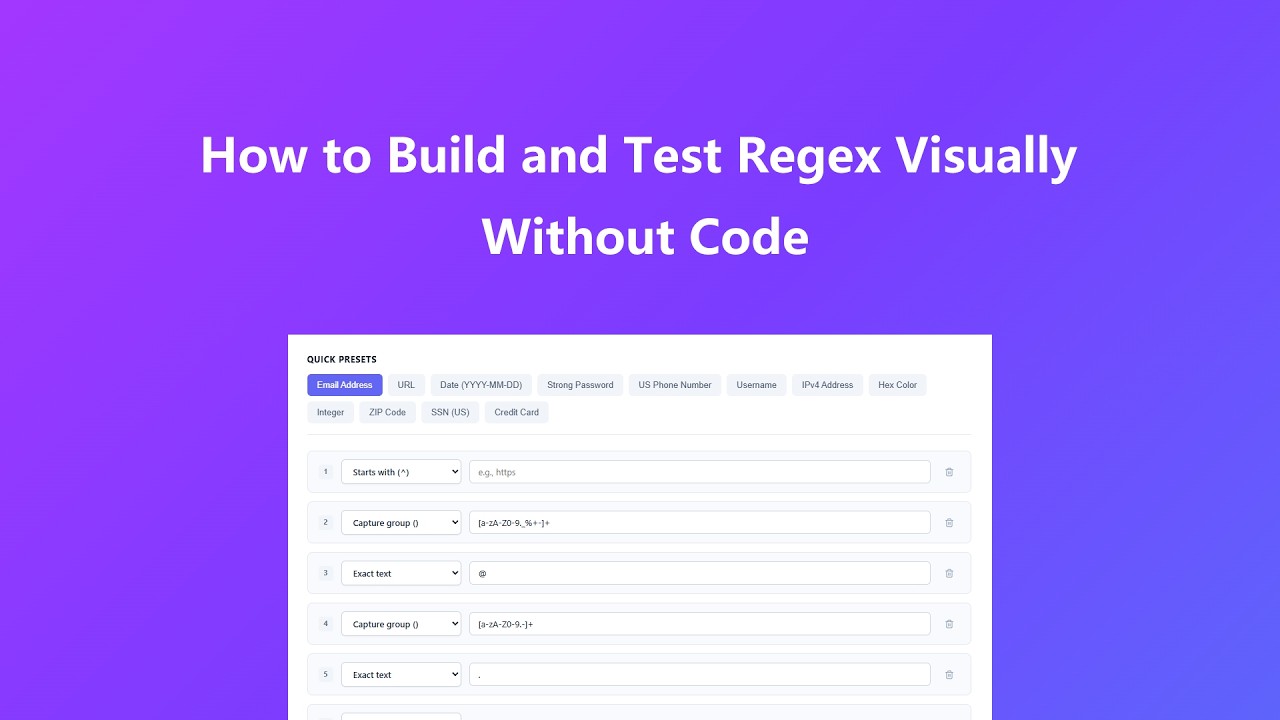
- Select a Quick Preset or Add Rules: Choose a ready-to-use preset like US Phone Number, ZIP Code, or Email Address to automatically seed the builder, or click "Add Rule" to construct a original pattern.
- Configure Matching Logic: Select rule types from the dropdowns (such as "Starts with", "Exact text", "Digits length", or "Capture group") and enter target values or numeric bounds.
- Adjust Flag Controls: Toggle global search (g), case-insensitivity (i), or multiline mode (m) to match the operational context of your application.
- Perform Live Sandbox Testing: Paste realistic sample data into the Test Input field to verify match accuracy, view character index spans, and inspect highlighted match groups in real time.
- Export Native Snippets: Switch between language tabs (JavaScript, PHP, Python, Java, Go) to inspect fully escaped code and click "Copy Code" to integrate it into your code base.
- Review Plain-English Breakdown: Read through the Pattern Breakdown section at the bottom to audit individual token responsibilities before deployment.
Key Features
- 12 Essential US & Dev Presets: Quick-load configurations for Email, Web URLs, Dates, Strong Passwords, US Phone Numbers, Usernames, IPv4, Hex Colors, Integers, US ZIP Codes, SSNs, and Credit Cards.
- Visual Rule Stacking: Modular interface for combining literal strings, character classes, quantifiers, and capture groups without writing manual syntax.
- Multi-Language Code Generator: Automatically formats regex syntax and execution logic for JavaScript, PHP, Python, Java, and Go with native escaping.
- Interactive Match Sandbox: Real-time visual highlight engine with exact character index tracking ([start–end]) for high-precision debugging.
- Token-by-Token Breakdown: Translates complex patterns into human-readable English explanations for seamless code auditing and team collaboration.
- Strict Client-Side Privacy: Runs entirely inside your browser using native ECMAScript RegExp engine; zero data transmission to external servers.
Common Use Cases
- Web Form Validation: Enforce clean format constraints on web forms for US phone numbers, standard 5-digit or ZIP+4 postal codes, and email credentials.
- API Input Sanitization: Validate incoming JSON payload parameters, route variables, and query parameters on API gateway endpoints.
- Log File Parsing: Extract IP addresses, HTTP status responses, timestamps, and error tokens from server logs or system event streams.
- Data Cleaning Pipelines: Identify, reformat, or redact sensitive fields like Social Security Numbers and card account numbers in ETL data processing pipelines.
- Security Policy Checks: Create patterns for strong password complexity rules, user handle constraints, and input escaping checks.
Frequently Asked Questions
Is my test data uploaded or stored anywhere?
No. All regex compilation and string testing execute entirely within your client web browser. No test data, regex strings, or input parameters are transmitted to any backend server.
Why does code syntax differ across language tabs?
Different programming languages handle regular expressions with unique wrapper methods, string escape rules, and flag syntaxes (e.g., PCRE delimiters in PHP vs. raw string literals in Python or double-backslash escaping in Java). The code window formats patterns specifically for each runtime environment.
What is the difference between Digits Length and Length Range?
Digits Length generates `\d{n,m}`, restricting input purely to numeric digits (0–9). Length Range generates `.{n,m}`, matching any character sequence including letters, symbols, and whitespace.
How does the tool handle capture groups?
Selecting "Capture group ()" allows you to define custom sub-patterns or alternatives. If your input starts with `?:`, the tool automatically interprets it as a non-capturing group for optimized performance.
Can I test patterns against multi-line text blocks?
Yes. Enabling the multiline (m) flag alters boundary anchors (`^` and `$`) to match the beginning and end of individual lines rather than the whole string.
How are US ZIP Codes matched by default?
The ZIP Code preset matches standard 5-digit ZIP codes as well as 9-digit ZIP+4 formats (e.g., 94105 or 10001-1234) using numeric character constraints.
Advanced Tips
- Use Explicit Boundary Anchors: Always include "Starts with" (^) and "Ends with" ($) rules when validating exact input field lengths to prevent partial matching bypasses.
- Prefer Digits Length for Numeric Data: Always use `\d{n,m}` over generic wildcard lengths when working with credit cards, SSNs, and postal codes to reject invalid alphabetic inputs.
- Validate Edge Cases in Sandbox: Test your expressions against both valid strings and intentional edge cases (e.g., empty strings, trailing spaces, special symbols) before copying code into production.
- Combine Flags Thoughtfully: Enable case-insensitivity (i) for user inputs where case variation is expected (such as hex colors or email domains) to enhance form usability.