JWT Debugger & Signer
All processing runs locally inside your browser with this JWT tool. Quickly decode, tweak and sign tokens using HS256, RS256 or ES256. We never log data on servers, and there’s zero lag at every step.
What is This Tool
This web-native debugger breaks down authorization signatures, cryptographic headers, and embedded data JSON claims for inspection and localized debugging. Engineered specifically to tackle the massive confidentiality hazards of dropping production secrets, session values, or API access claims into cloud-dependent decoders, this panel guarantees zero external server routing. It acts as an independent sandbox system that maps out token parameters securely on your immediate machine hardware.
By bypassing remote data ingestion hooks completely, engineers can analyze authentication configurations or modify administrative privileges on the fly without risking leakage or credential harvest. The layout maps color indicators across standard string variables while providing instant validation updates using your browser's dedicated processing core.
How to Use
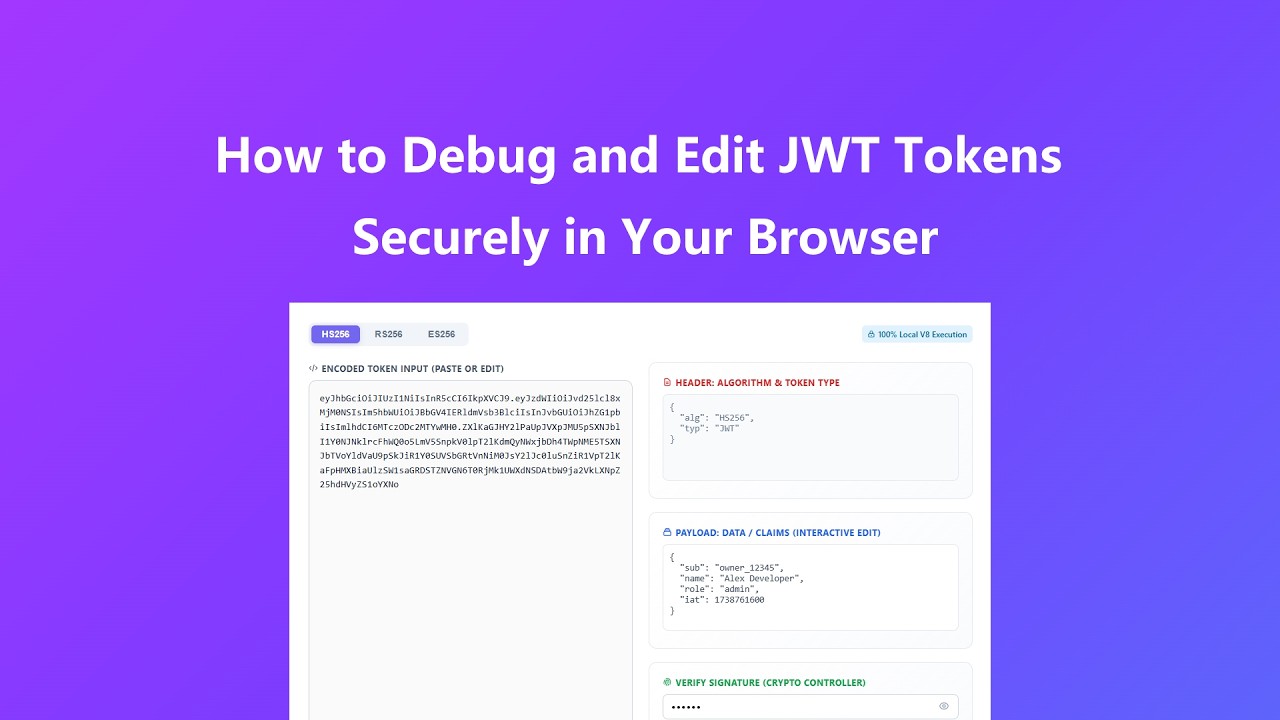
Inspecting or issuing authorization tokens requires zero external network roundtrips within this structural sandbox workshop:
- Drop your active authentication string array directly into the left input container to trigger automatic string segregation.
- Examine the decoded variable layouts inside the dedicated header block and inspect user scope permissions within the interactive payload canvas.
- Type updated metrics directly into the active payload claims editor box to witness instant string compilation on the left display sheet.
- Provide your local verification keys or change the secret string block to update structural authentication confirmations instantly.
Key Features
- Local V8 compilation decomposes complex Base64Url parameters without making network requests, guaranteeing complete data isolation.
- Bi-directional live updating tracks payload dictionary alterations, recreating matching token arrays in real time.
- Visual division grids assign custom distinct styles to individual components, highlighting authorization splits cleanly.
- Multi-algorithm support switches smoothly across HMAC options and asymmetric structures to meet versatile system designs.
- Secure client validation combines pure JavaScript processing to check block status without requiring central authority connections.
Common Use Cases
- Decomposing live application tokens to verify user claims, scope definitions, or expiration dates during integration testing.
- Generating test-environment authentication strings on the fly by updating payload arguments inside an offline developer sandbox.
- Troubleshooting expired login configurations by checking historical timestamp markers against current system clocks.
- Verifying custom application backend signature verification algorithms against standard local client cryptographic logic.
- Teaching secure engineering teams the operational mechanics of asymmetric and symmetric identity verification processes safely.
Frequently Asked Questions
How does this tool perform token verification without sending my secrets over the web?
This tool works entirely within your local browser page lifecycle. It processes the base64 decoding loops and applies signature calculations inside your tab's dedicated runtime, allowing full offline operation.
Why does changing a single symbol inside the token string break the verification light?
Tokens rely on strict cryptographic block tracking. Overwriting a single value alters the integrity check, prompting the verification layout to show a warning state immediately.
Can I troubleshoot asymmetric tokens that rely on remote JWKS URL lookups?
To avoid security leaks from external server calls, this tool requires you to paste your certificate or key components directly into the local control fields to keep operations fully sandboxed.
Will my browser preserve historical secret credentials when I close this browser tab?
No, this tool avoids persistent storage to maintain security. All text inputs, claims, and verified secrets vanish from device memory as soon as you close or reload the active tab window.
Why do my modified expiration dates fail to validate on my local development server?
Ensure that your local server and verification code use the exact same algorithm and secret key string as the tool, and verify that system clocks are properly synchronized.
Advanced Tips
Optimize your authentication workflows with these direct system engineering tips:
- Convert your public keys into pure standard layout strings before dropping them into asymmetric verification boxes to avoid parsing errors.
- Use the visible eye button to check your secret string input configuration details and prevent mismatched text parameters.
- Check your claims for standardized UNIX epoch timestamp seconds when manually modifying token duration configurations inside the code block.
- Isolate your structural troubleshooting tasks by disconnecting your local development machine from public networks entirely while auditing active tokens.