Barcode Generator for Web Free Online
Create professional barcodes for free with our online generator. Fast, easy, and supports multiple formats like EAN, UPC, QR, and Code 128. No registration required.
Start typing to generate a live preview
What Is This Tool
This is a professional-grade barcode generator built for retailers, warehouse managers, e-commerce sellers, and anyone who needs industry-standard barcodes without paying for proprietary software. It supports the most widely used symbologies — EAN-13, EAN-8, UPC-A, UPC-E, Code 128, and Code 39 — and generates output that is fully compatible with standard laser scanners and optical readers.
Every barcode is generated directly in your browser with real-time validation and live preview. No data leaves your device, no account is required, and there are no download limits. Customize bar dimensions, colors, and text display, then export a crisp SVG or PNG file ready for labels, packaging, and print runs of any scale.
Need more than one barcode at a time? Switch to Batch Mode, upload a TXT or XLSX file containing your product numbers or SKUs, and generate up to 500 barcodes in a single pass — each one validated against your selected format and packaged into a single ZIP download.
How to Use
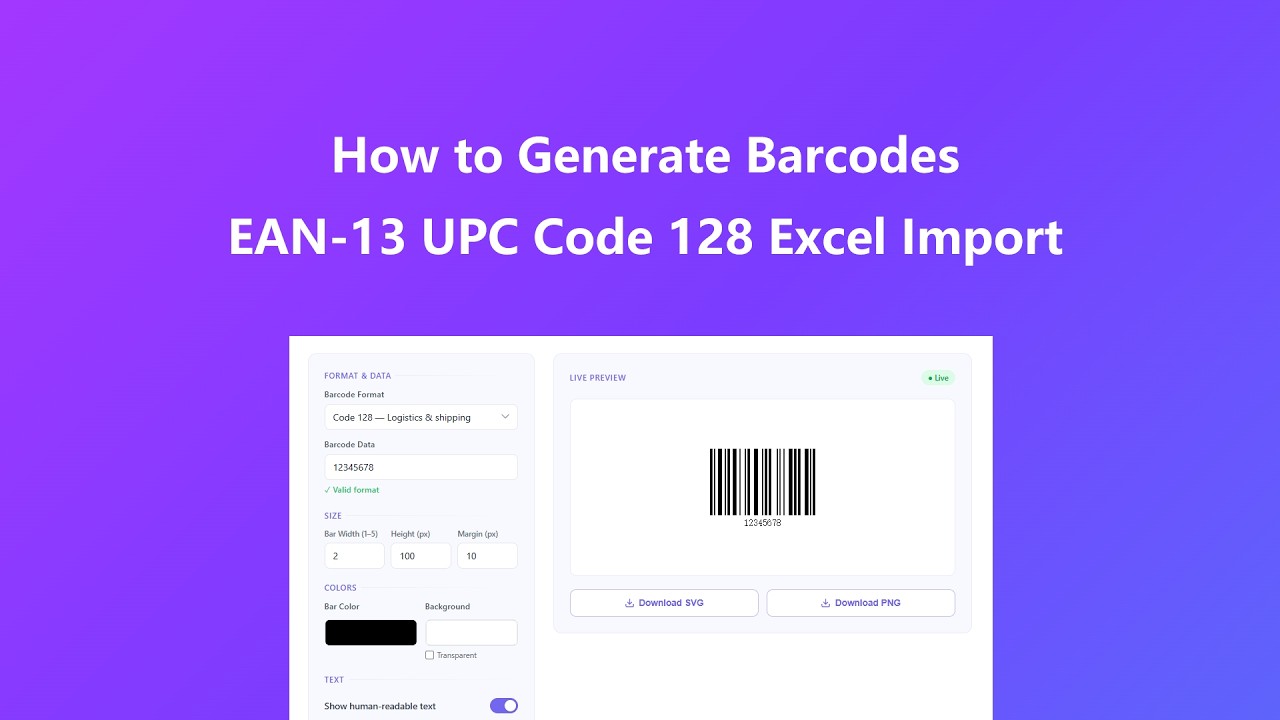
- Choose a format. Select the barcode type that matches your use case — EAN-13 or UPC-A for retail products, Code 128 for shipping and logistics, Code 39 for industrial or alphanumeric tracking.
- Enter your data. Type your barcode value in the input field. The tool validates your entry in real time and tells you immediately if the length or characters are incompatible with the selected format. Press Enter or click Generate Barcode at any time to render it.
- Customize the output. Adjust bar width (1–5), height in pixels, and margin. Choose bar and background colors, and toggle the human-readable text on or off. All changes apply instantly — no need to click Generate again.
- Preview at print size. Select a print template — label sizes, A4, or US Letter — to see how your barcode will look relative to a real-world sheet before you export.
- Download your file. Export as SVG for professional printing where crisp edges are critical, or PNG for digital documents and online use.
- Generate in bulk (optional). Set your format, size, color, and text preferences first, then scroll to Batch Generate and upload a .txt file (one value per line) or an .xlsx spreadsheet (values in the first column). The tool validates every row and lists which ones are ready to encode.
- Download the ZIP archive. Click "ZIP of SVGs" or "ZIP of PNGs" to generate and download every valid barcode from your file at once, each one named after its source value.
Key Features
- Live preview. Every parameter change — data, size, color, or text setting — updates the barcode instantly without pressing a button.
- Six industry-standard formats. EAN-13, EAN-8, UPC-A, UPC-E, Code 128, and Code 39 cover the full range of retail, logistics, and industrial scanning requirements.
- Full size control. Set bar width, height, and margin precisely to match your label stock or packaging specifications.
- Color customization. Change bar color and background color independently to meet brand or design requirements.
- Text display control. Show or hide the human-readable digits below the bars, and set a custom font size from 8 px to 40 px.
- Print template preview. Visualize your barcode on common label and page sizes — including 1"×0.5" small tags, 4"×2" shipping labels, A4, and US Letter — before you print.
- SVG and PNG export. SVG output is vector-based and scales to any print resolution; PNG is ready for digital documents and web use.
- Batch generation from TXT or XLSX. Upload a plain text list or a spreadsheet column of up to 500 values and generate every barcode in one click, downloaded together as a single ZIP file.
- Per-row validation. Each uploaded value is checked against the rules of your selected format before it's added to the batch, so you know exactly which rows will encode successfully.
- Fully private. All processing — single or batch — runs locally in your browser. No file, spreadsheet, or barcode data is ever uploaded to a server.
Common Use Cases
- Retail product labeling. Generate GS1-compliant EAN-13 or UPC-A codes for shelf-ready packaging that scans at any point-of-sale terminal.
- Shipping and fulfillment. Create Code 128 barcodes for carton labels, packing slips, and carrier integration in warehouse and 3PL environments.
- E-commerce inventory. Build internal SKU barcodes to link physical products to your inventory management system or Shopify / WooCommerce catalog.
- Asset tracking. Tag IT equipment, tools, or physical assets with Code 39 labels for quick check-in and check-out workflows.
- Event and venue management. Print scannable ticket or badge barcodes for entry verification at conferences, trade shows, or private events.
- Small business self-publishing. Create professional product identifiers for handmade goods or local market items without licensing fees or minimum orders.
- Bulk catalog rollouts. Upload a spreadsheet of SKUs or product codes and generate an entire product line's barcodes in one batch instead of one at a time.
- Data migration and re-labeling. Export existing product numbers from your POS or inventory system to a TXT file and regenerate the full set with new sizing or branding in minutes.
Frequently Asked Questions
Are these barcodes scannable by professional scanners?
Yes. All barcodes generated here strictly follow international industry standards and are compatible with standard laser and optical scanners used in retail, logistics, and industrial environments. Always do a test scan before committing to a large print run.
What is the difference between SVG and PNG downloads?
SVG is a vector format that scales to any size without losing quality, making it the preferred choice for professional printing where precise bar edges are critical for scanner reliability. PNG is a fixed-resolution raster image suited for digital documents, web pages, and quick proofing. If you plan to print, always use SVG.
How many digits does EAN-13 require?
EAN-13 requires exactly 12 or 13 numeric digits. If you enter 12 digits, the tool automatically calculates and appends the correct check digit. If you enter all 13, the final digit is validated against the standard checksum algorithm. The tool will alert you immediately if your input does not meet the requirement.
What characters can Code 128 and Code 39 encode?
Code 128 can encode the full ASCII character set (128 characters), including upper and lowercase letters, digits, and special symbols — making it ideal for alphanumeric serial numbers and shipping labels. Code 39 supports uppercase letters A–Z, digits 0–9, and a limited set of special characters (-, ., $, /, +, %, and space), which covers most industrial and inventory use cases. If you type lowercase letters, the tool automatically converts them to uppercase before encoding, since Code 39 scanners only recognize uppercase characters.
Is my barcode data stored on your server?
No. All barcode generation happens entirely in your browser using JavaScript. No data is transmitted to or stored on any server. This tool works fully offline once the page has loaded.
Can I change the barcode color for branded labels?
Yes. Use the Bar Color and Background color pickers to customize the appearance. Keep in mind that scanner reliability depends on sufficient contrast between bar and background. Dark bars on a light background always scan most reliably; avoid low-contrast combinations like dark gray on dark blue for production use.
How does batch generation work?
Set your barcode format, size, colors, and text options first, since those settings apply to every barcode in the batch. Then upload a .txt file with one value per line, or an .xlsx file with values in the first column, and the tool checks each row against your selected format. Click "ZIP of SVGs" or "ZIP of PNGs" to download every valid barcode as separate files inside one ZIP archive.
Is there a limit to how many barcodes I can batch generate?
Yes, batch mode processes up to 500 rows per file to keep generation fast and reliable in your browser. If your file has more rows, only the first 500 are used — split larger lists into multiple files and run them one at a time.
What happens to invalid rows in my batch file?
Every row is validated against the rules of the format you selected — for example, EAN-13 requires 12 or 13 digits. Rows that fail validation are marked "Invalid" in the results list and are skipped from the ZIP download, while valid rows are still generated normally.
Advanced Tips
- Always export SVG for print. SVG preserves the exact bar-to-space ratio required for scanner reliability at any scale. Never stretch or distort a PNG barcode — if you need a different size, regenerate it with the correct dimensions.
- Use the print template preview before ordering labels. The template view gives you a proportional reference against standard label and page sizes so you can spot sizing issues before you print a full sheet.
- Keep Code 128 strings concise. Longer data strings produce wider barcodes. If your scanner has a fixed field of view, shorter data reduces the risk of misreads at the edges.
- Test before you commit. After generating your barcode, scan it with a smartphone barcode scanner app (like the native camera on iOS/Android) before sending the file to a printer or label vendor.
- Contrast is critical for color customization. The ISO 15416 print quality standard recommends a minimum contrast ratio of 70% between bars and background. Stick to near-black bars on white or very light backgrounds for production labels.
- Match bar width to your printer resolution. A bar width of 1 on a low-DPI printer may produce blurry edges. If you see scanning issues, increase bar width to 2 or 3 to create thicker, more readable bars at lower print resolutions.
- Lock in your style before batch generating. Every value in a batch file shares the same format, size, color, and text settings, so generate one sample barcode first to confirm it looks and scans correctly before uploading the full list.
- Clean your data before uploading. Remove blank rows, extra spaces, and duplicate values from your TXT or XLSX file beforehand — the tool trims whitespace automatically, but duplicate SKUs will still produce duplicate barcodes.
- For XLSX files, only the first column is read. If your spreadsheet has headers or multiple columns, move the barcode values into column A before uploading, or the tool will attempt to encode the wrong data.