Free QR Code Generator
Generate high-quality custom QR Codes instantly for URLs, text, Wi-Fi, and vCards. 100% client-side processing ensuring your data never leaves your browser. Fast, secure, and completely free.
Drop or click to upload logo
PNG, JPG, SVG supported
will appear here
What is This Tool
Most QR code generators online do one of two things wrong: they make you sign up, or they upload your data to a server somewhere. This tool does neither. Everything - the encoding, the styling, the logo embedding - runs entirely inside your browser. Close the tab and nothing leaves your device.
Beyond privacy, it covers the six content formats people actually need: web links, plain text, Wi-Fi credentials, digital business cards (vCard), email drafts, and SMS messages. Each type automatically formats the data to spec so the resulting code works across all major smartphone cameras without any extra apps.
How to Use
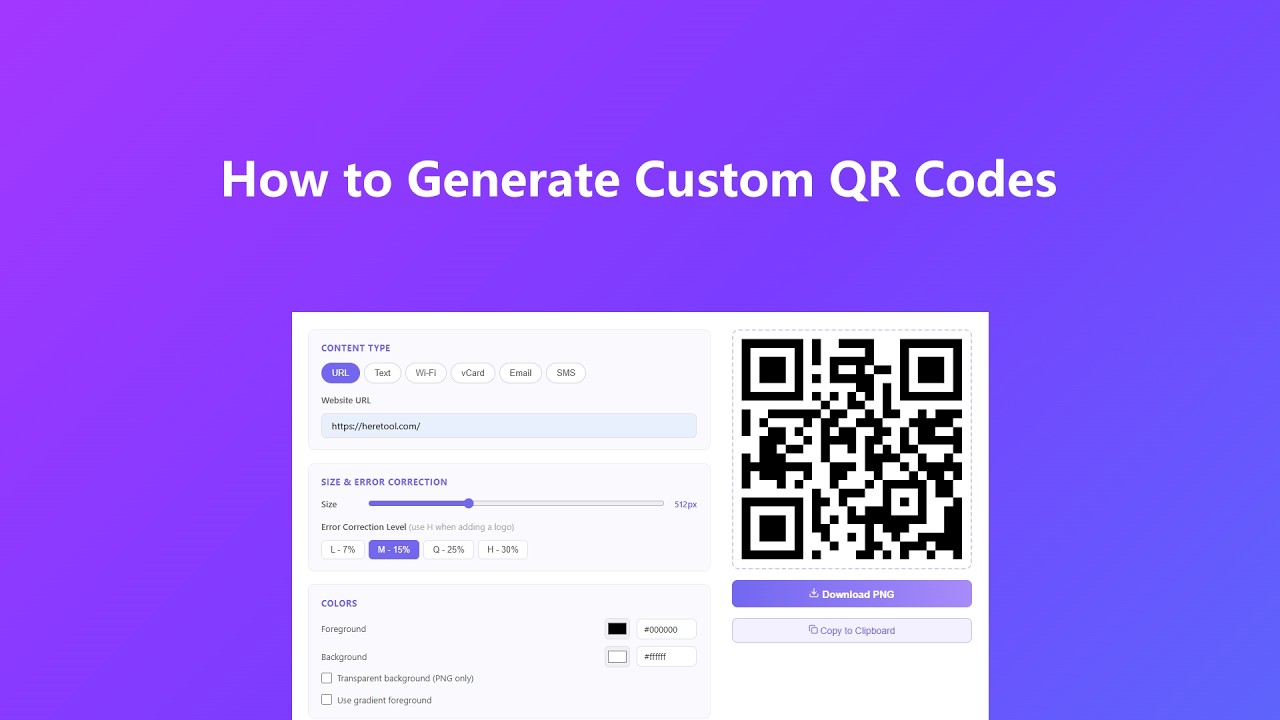
Getting a finished QR code takes about 30 seconds:
- Pick a content type - URL, Text, Wi-Fi, vCard, Email, or SMS - using the tab buttons at the top of the editor. Fill in the fields that appear. The tool handles all the formatting behind the scenes so the code scans correctly every time.
- Dial in the visuals. Adjust the output size, pick dot and eye shapes, set your colors or switch on a gradient. If you need the background transparent for use on a colored banner or packaging, just check that box.
- Add your logo if you want one. Upload any PNG, JPG, or SVG, set how much of the code it covers, and enable auto-clear so the dots beneath it don't fight with the image. Bump error correction to H whenever you embed a logo.
- The preview refreshes automatically as you type and adjust styling, so you can see changes take effect in real time. Once it looks right, download the PNG or copy it straight to your clipboard - the exported file matches whatever pixel size you set, crisp at any scale.
Key Features
- Six input modes in one place handle the formats you run into daily - paste a URL, type a Wi-Fi password, or fill out a contact card. The tool assembles the correct QR data string automatically, so you never have to worry about protocol prefixes or escape characters.
- Live preview renders in real time as you type or tweak styling - no need to keep clicking a button to see the result. Every module is drawn as a crisp, fully solid block straight from the QR data, so colors and edges stay clean at any export size.
- Full visual control lets you choose from three dot shapes (Square, Dots, Liquid) and independently style the outer frame and inner dot of each corner eye - a detail that makes branded codes look intentional rather than generic.
- Gradient foreground color runs horizontally, vertically, or diagonally across the dots, giving you a visually distinctive code without breaking scannability.
- Client-side logo embedding processes your image entirely in the browser canvas. Nothing touches a server. The auto-clear option removes the QR modules directly beneath the logo so the image stands out cleanly and the code still scans reliably.
- Transparent background export is a one-click option for designers who need to drop the code onto a dark surface, colored background, or custom printed material without a white rectangle getting in the way.
Common Use Cases
Here's where people actually put this to work:
- Restaurant menus and event signage - generate a URL code for your menu link, add your logo, and drop it on a table tent or banner without paying a monthly subscription to a QR platform.
- Conference and networking - fill in the vCard fields, generate, and print. Anyone who scans your badge or business card gets your contact saved directly to their phone without typing a single character.
- Guest Wi-Fi sharing - entering a long Wi-Fi password for every guest gets old fast. A Wi-Fi QR code on the fridge or front desk lets anyone join in one scan, no password spoken out loud.
- Marketing print materials - flyers, packaging, postcards. The gradient and custom-shape options mean the code looks like it belongs on the design rather than being pasted on at the last minute.
- Personal use - link a QR to a playlist, a portfolio site, a payment link, or a birthday party invite. Download the PNG and drop it wherever you need it.
Frequently Asked Questions
Does any of my data get sent to your servers when I generate a QR code?
No. All encoding and rendering happens inside your browser using the Canvas API. Your URLs, contact details, Wi-Fi passwords, and uploaded logos never leave your device. You can verify this by turning off your internet connection after the page loads - everything still works.
Why does my QR code with a logo sometimes fail to scan?
The two most common reasons are the logo covering too much of the code or the error correction level being set too low. Set error correction to H (30%) whenever you add a logo, and keep the logo size under 25% of the total code area. The auto-clear option also helps by removing overlapping dots that can confuse scanners.
What size should I export for print vs. digital?
For screen use - websites, presentations, email - 256px to 512px is plenty. For print, go with 512px or higher, ideally 1024px, so the code stays sharp at larger physical sizes. At 300 DPI, a 1024px export prints cleanly up to about 3.4 inches square.
Can I use a transparent background with dark-colored dots?
Yes, that combination works great for placing QR codes on colored backgrounds in design software or print layouts. Just check the transparent background option and download as PNG - the PNG format preserves the alpha channel, so your background color shows through rather than a white box.
Do I still need to click the Generate button?
Not usually. The preview updates automatically about a third of a second after you stop typing or change a style option. The Generate button is mainly there for your very first QR code on the page, or if you just want to force an immediate refresh.
Do I need an account or is there a limit on how many QR codes I can make?
No account, no limit. Generate as many as you want for free. Since the processing runs locally in your browser, there's no server cost on our end to throttle.
Advanced Tips
A few things that'll save you time and headaches:
- Test before you print. Scan the generated code on your phone before committing it to 500 business cards or a banner order. Try it in different lighting conditions - if it scans in a dim room it'll scan anywhere.
- For Wi-Fi codes, make sure the SSID and password fields exactly match what your router uses, including capitalization and any special characters. One wrong character and the auto-join fails silently, which is frustrating for guests.
- When building branded codes with gradients, keep enough contrast between the lightest gradient color and the background. Light purple dots on a white background can scan fine on screen but wash out on glossy print stock - add 30% more contrast than you think you need.
- The vCard format this tool generates is vCard 3.0, which is supported by iOS Contacts, Android, and Outlook. If someone scans it and nothing happens, their camera app may not support vCard natively - tell them to use a dedicated QR scanner app instead.