llms.txt Generator
Create a standard /llms.txt file for your website instantly. Guide LLMs, AI agents, and search engines to crawl and understand your content perfectly. 100% client-side, secure, and free.
Import from Sitemap
Site Identity
Core Information
Optional Sections
Links / Resources
# Your site name will appear here

> Fill in the fields on the left to generate your llms.txt file.
What is This Tool
If you've ever wondered how AI tools like ChatGPT, Perplexity, or Claude actually read and summarize websites, the answer is usually: badly, because they're scraping pages never designed for machine consumption. The llms.txt Generator fixes that. It helps you create a clean, Markdown-formatted file that you place at the root of your domain (like robots.txt), giving AI agents a reliable, structured summary of your site instead of letting them guess from random HTML.
The llms.txt standard is a proposed convention that puts you in control of how large language models interpret your content. Think of it as a press kit for AI — you define your site's purpose, key pages, API details, and any rules you want AI crawlers to respect. This tool handles all the formatting so you can generate a spec-compliant file in under two minutes without touching a text editor.
Building the page list by hand gets tedious once a site grows past a handful of URLs, so this generator can also read your sitemap.xml directly in your browser. Paste in the address (or the raw XML itself), and every page it contains is ready for you to review and add to your Key Pages section with a click, instead of retyping each link one at a time.
How to Use
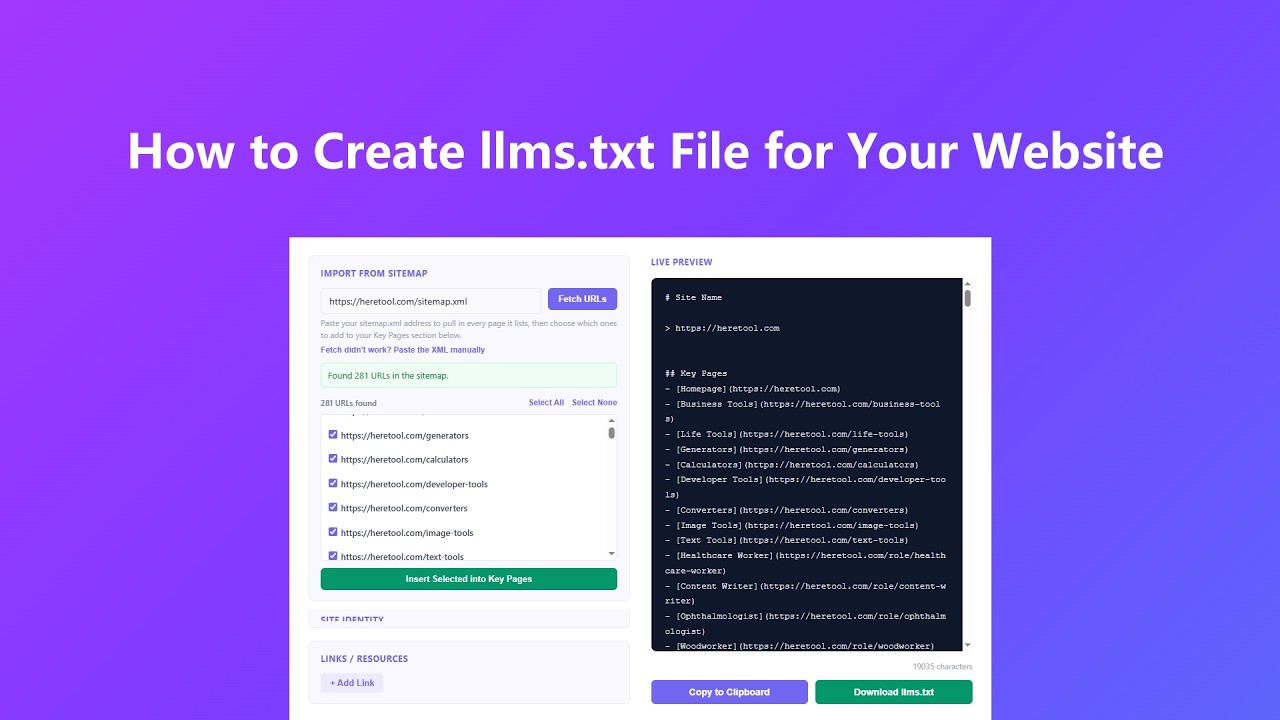
Getting your llms.txt file ready is a straightforward process. Here's how to go from blank to download:
- Already have a sitemap.xml? Paste its URL into the Import from Sitemap box and click Fetch URLs. The tool reads every page it lists, shows them as a checklist, and lets you insert the ones that matter most straight into your Key Pages section. If your browser can't reach the file directly, use the "Paste the XML manually" option instead.
- Fill in your site's name, homepage URL, and a single-sentence description in the Site Identity section. This becomes the title and byline of your llms.txt file, so keep the description focused on what the site actually does rather than marketing language.
- Paste or type your core content in Markdown format — things like a list of key pages, feature summaries, or API endpoint notes. This is the main body AI agents will read, so structure it with clear headings and short bullet points.
- Use the Optional Sections builder to add any extra blocks you need, like ## Permissions, ## FAQ, or ## Contact. Each section gets its own heading and content area, and you can add or remove as many as you want.
- Add any important links in the Links section — documentation, API references, support pages — and watch the live preview update instantly on the right. When the file looks right, hit Copy or Download to grab your llms.txt.
Key Features
- Sitemap.xml import reads your site's existing sitemap straight from its URL — including sitemap index files with multiple child sitemaps — and lets you pick exactly which pages to drop into your Key Pages section. If a site blocks the direct fetch, you can paste the XML in by hand instead.
- Real-time live preview renders your llms.txt output as you type, so you can see exactly what AI agents will read without clicking a generate button. Every field you update is reflected instantly in the formatted preview panel.
- The optional sections builder lets you add any number of custom Markdown sections on the fly. Name the heading, drop in your content, and the tool slots it into the correct position in the file structure automatically.
- Dynamic resource links allow you to attach as many annotated URLs as you need — each with a display label, URL, and short description — formatted precisely to the llms.txt link specification.
- One-click download saves a properly named llms.txt file directly to your computer using browser-side Blob handling. Your form fields are never stored on our end and nothing about your site content is logged.
- Full mobile support means the input panel, sitemap importer, and live preview stack cleanly on smaller screens, so you can draft and export your file from a phone or tablet without the layout breaking.
Common Use Cases
Anyone publishing content that AI tools might read has a reason to care about llms.txt. Here's where it's made the biggest difference:
- SaaS and developer tools use llms.txt to point AI agents directly at their API docs, changelog, and pricing page, cutting down on hallucinated feature descriptions that show up when someone asks an AI about their product.
- Content publishers and media sites add an llms.txt to signal editorial guidelines, licensing terms, and which sections of the site are okay for AI to summarize versus paywalled areas that should be excluded.
- E-commerce businesses include product category summaries and return policy links so AI shopping assistants can surface accurate information instead of outdated cached data.
- Agencies building sites for clients can import the client's existing sitemap.xml straight into this tool, generating a fresh llms.txt during the launch checklist right alongside robots.txt, to future-proof the site against AI search engine misinterpretation.
- Open-source projects use llms.txt to document install steps, repository structure, and contribution guidelines in a way that coding assistants can reliably pull from when helping users troubleshoot.
Frequently Asked Questions
What is llms.txt?
It's a newly proposed standard, similar in concept to robots.txt, that provides a clean Markdown-formatted summary of your website specifically designed for LLMs and AI agents to read. Instead of crawling scattered HTML pages, an AI can read one well-structured file to understand what your site is, what it offers, and where to find specific information.
Why should I use an llms.txt Generator?
Writing a spec-compliant llms.txt by hand is tedious and easy to get wrong. This tool handles the formatting, section ordering, and link syntax automatically. You focus on the content; the generator handles making sure the output follows the standard so AI agents can actually parse it correctly.
Can I import pages directly from my sitemap.xml?
Yes. Enter your sitemap.xml URL in the Import from Sitemap box and click Fetch URLs, or use the "Paste the XML manually" option to drop in the file's contents yourself. The tool supports both standard sitemaps and sitemap index files that point to multiple child sitemaps. Once the pages load, check the ones you want and click Insert Selected into Key Pages to add them to your Core Information as a formatted Markdown list.
Where do I put the llms.txt file once I download it?
Upload it to the root directory of your web server so it's accessible at https://yourdomain.com/llms.txt. This is the same location where you'd find robots.txt or sitemap.xml. Most hosting platforms let you drop it in via FTP, an admin file manager, or a deployment pipeline.
Is my site's information sent to any server when I use this tool?
Everything you type into the form fields — site name, description, core content, sections, and links — stays in your browser. The live preview is generated by JavaScript running locally on your device, and the download is triggered via a browser Blob URL, so none of that content is transmitted or stored anywhere. The one exception is the Import from Sitemap feature: your browser tries to read the sitemap directly first, and only if the target site blocks that cross-origin request does it retry through a public CORS proxy service to retrieve the file on your behalf. If you'd rather avoid that entirely, use the "Paste the XML manually" option instead, which never leaves your browser.
Why does the sitemap sometimes fail to fetch automatically?
Browsers block cross-origin requests by default unless the target server explicitly allows them, so some sitemaps can't be read directly no matter how the request is made. When that happens, open the sitemap URL in a new tab, copy the page's XML source, and paste it into the "Paste the XML manually" box — it produces the exact same result.
Do all AI tools actually support llms.txt right now?
The standard is still gaining adoption, but several AI search engines and coding assistants have already started recognizing it, and the list is growing fast. Publishing an llms.txt now is a low-effort way to prepare for broader support without any downside — it won't hurt your existing SEO or site performance.
Advanced Tips
Once you've got the basics down, these approaches will make your llms.txt significantly more effective:
- Lead with your most important page links in the Core Information section rather than a description. AI agents tend to prioritize early content, so putting your docs, pricing, and primary use-case pages near the top increases the chance they get surfaced in AI responses.
- If your site has hundreds of pages, use the sitemap import to see the full list at once, then be selective about what you insert. A short, well-chosen Key Pages list is more useful to an AI agent than a comprehensive dump of every URL on the site.
- Use a ## Permissions section in Optional Sections to explicitly state what AI tools are and aren't allowed to do with your content — for example, whether summarization is okay but verbatim reproduction isn't. This is especially useful for news sites and publishers with syndication rules.
- Keep each bullet point in your Core Information to a single idea. AI models parse Markdown list items as discrete facts, so cramming two concepts into one bullet often means one of them gets ignored or blended incorrectly.
- Treat your one-line description like a meta description for AI: write it as a complete sentence that would still make sense if read out loud by a voice assistant. Avoid jargon, superlatives, and anything that reads like ad copy — AI agents weight plain factual language more reliably than promotional phrases.