Running Pace Calculator
Calculate your running pace, time, or distance instantly. Plan your marathon, half-marathon, or 5K split times. 100% client-side, ad-free, and optimized for runners.
Split Chart
Solve for pace or time above and your mile-by-mile chart shows up here.
Training Pace Zones
Drop in a recent race result and get the five training paces coaches actually use, based on a simplified VDOT model.
What is This Tool
Every runner has done the same napkin math: dividing 26.2 by a goal time, trying to remember what pace gets you a sub-20 5K, or guessing at splits before a race and getting it wrong by ten seconds a mile. This running pace calculator gets rid of that guesswork. Punch in any two of pace, time, or distance and it fills in the third the moment you stop typing, no submit button, no page reload.
It is built around one simple relationship that runners live by: distance equals pace times time. Once you have your pace or finish time locked in, the tool goes further than a basic calculator by breaking your race into a full mile-by-mile or kilometer-by-kilometer split chart, and by turning a recent race result into training paces for your easy days, tempo runs, and speed work. Every time field also doubles as a quick-pick dropdown of common paces and finish times, so you can select a number instead of typing it out digit by digit. It is the kind of math a coach would do for you, minus the coach.
How to Use
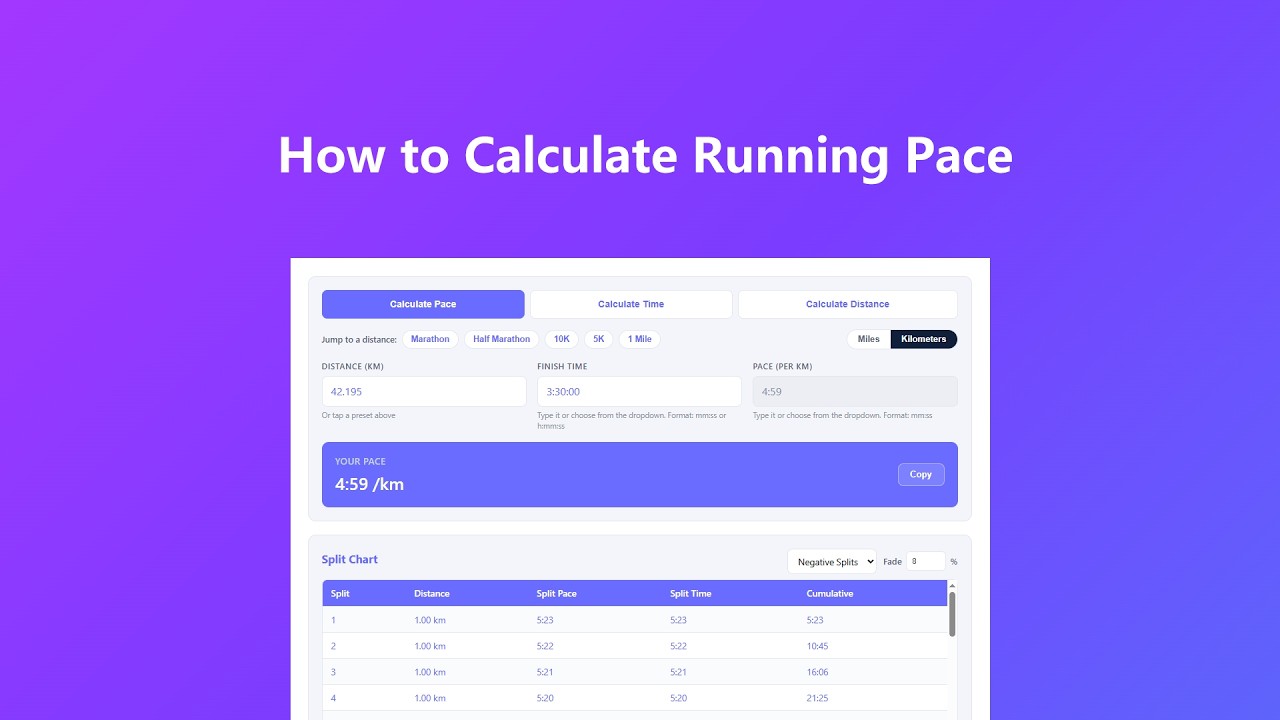
You do not need to know which number you are solving for ahead of time. Pick a tab, type or pick what you know, and the rest fills itself in:
- Pick your tab first. Choose Calculate Pace if you know your distance and finish time, Calculate Time if you know your distance and target pace, or Calculate Distance if you know your time and pace but not the distance.
- Set your units and grab a preset. Toggle between Miles and Kilometers at the top, then tap Marathon, Half Marathon, 10K, 5K, or 1 Mile to drop in the exact standard distance instead of typing it out.
- Fill in the two open fields your way. Type a value directly, or click the dropdown arrow on the Finish Time or Pace field to choose a common number instead. The locked field updates on its own, no calculate button, and you can switch tabs any time without losing what you already entered.
- Scroll down for your splits and zones. Once a pace and time are on the board, your mile or kilometer split chart builds automatically, and a recent race result in the training zones box unlocks your five personal training paces.
- Copy your result when you are done. The Copy button next to your answer sends it straight to your clipboard so you can paste it into a note, message, or training log.
Key Features
- Solve for any of the three variables. Distance, time, or pace, whichever one you are missing gets calculated the instant you finish typing the other two, with no delay and no button to press.
- Type it or pick it. Finish time and pace fields accept manual typing and also open a built-in dropdown of common race times and training paces, so you can enter numbers however is faster for you.
- Race distance presets built in. Marathon, half marathon, 10K, 5K, and 1 mile are one tap away in either miles or kilometers, so you never have to remember that a marathon is 26.2188 miles.
- A real split chart, not just a total. Toggle between even splits and negative splits, adjust how much you want to fade or surge with a simple percentage, and see every checkpoint's pace and cumulative time laid out mile by mile.
- Training paces from a real race result. Enter a recent 5K, 10K, half, or marathon time and the tool converts it into your Easy, Marathon, Threshold, Interval, and Repetition paces using a VDOT-based formula.
- Built-in input checks. If a time or pace is typed in the wrong format, the field is flagged right away so you can fix it before it throws off your splits.
- Runs entirely on your device. There is no server round trip for any of these calculations, which means results show up instantly whether you have a great connection or none at all.
Common Use Cases
People pull this tool up for all kinds of reasons, and most of them boil down to needing a number fast before a run, not after one:
- Setting a realistic race goal. Plug in the finish time you want for an upcoming 10K or marathon and see exactly what pace you need to hold, so you are not just picking a number out of thin air.
- Working out a training run before you leave the house. Know your route distance and want a certain effort level? Calculate Time tells you roughly when you should be back.
- Building pacing strategy for race day. The split chart shows you what your watch should read at every mile marker, which is a lot more useful than a single average pace when you are trying to hold back early.
- Converting a treadmill or track workout. Treadmills speak in miles per hour and minutes, tracks speak in meters, this tool bridges the gap so you can compare a treadmill tempo run to your outdoor pace.
- Figuring out what your recent race actually says about your fitness. Instead of guessing at easy day pace, drop your last 5K or 10K time into the training zones section and get numbers built on that result.
- Quickly testing a few goal times. Open the Finish Time dropdown, click through a handful of common race times, and watch your required pace update instantly for each one, without retyping anything.
Frequently Asked Questions
Do I have to type times exactly, or can I select them instead?
Both work. Click into the Finish Time or Pace field and type a value directly, or click the small dropdown arrow to choose from a list of common finish times and paces. Picking from the list fills the field for you in the correct mm:ss or h:mm:ss format, which is handy on a phone where typing colons is annoying.
How does the negative split percentage actually work?
The fade percentage you set spreads your pace out on a straight line across the race, a few seconds slower per mile than average at the start and the same amount faster at the end, so the two sides balance out to your overall time. A 3 percent fade is a solid starting point for most runners; bump it up if you know you tend to go out fast and pay for it late.
Where do the training zone numbers come from?
They are based on a simplified version of the VDOT method, which estimates your current running fitness from a single race result and maps it to five effort-based training paces. It is a solid starting point for structuring a training block, but it is an estimate, not a lab test, so treat it as a guide rather than gospel.
Which race time should I use for the training zones?
Use your most recent race, not a personal best from three years ago. A time run in real race conditions in the last month or two gives you a far more honest read on your current fitness than an old result or a time trial you ran alone.
Why does switching between miles and kilometers change my pace number?
A mile is longer than a kilometer, so your per-mile pace number will always be a bigger number than your per-kilometer pace at the same speed. Switching units automatically recalculates whatever you already entered, so your actual effort stays exactly the same, only the label changes.
Can I use this for a treadmill run or does it only work for road races?
It works for either. Enter the distance and time from your treadmill display just like you would for an outdoor run, and the tool hands back the same pace, split chart, and training zone numbers either way.
Advanced Tips
A few small habits separate runners who pace well from runners who blow up at mile 20:
- Build in a small buffer on hot or hilly courses. The tool gives you the math for flat, controlled conditions, so on a hilly course, plan on your target pace being a floor, not a guarantee, and let the effort dictate the pace on the climbs.
- Test your negative split plan on a long run before race day. Set your fade percentage, print or screenshot the split chart, and actually try to hit those numbers during a training run so race day is not the first time you have run that pattern.
- Recheck your training zones every few weeks. Fitness moves fast when you are training consistently, so a 5K time from two months ago will undersell what you are capable of now, plug in a fresher result when you have one.
- Use the Interval and Repetition paces sparingly. Those two zones are meant for short, controlled reps with recovery in between, not for a steady run, treating them like a tempo pace is a fast way to end up injured or burnt out.
- Save time on repeat visits. If you are checking a few possible goal times back to back, use the Finish Time dropdown instead of retyping, and use Copy to grab your final pace for your watch or training app.