Mouse Click Test
A fully local, browser-native CPS counter and double-click diagnostic tool. Evaluate mouse click response speed and precisely identify hardware chatter without any input latency.
CLICK TO START
What Is This Tool?
The Mouse Click Speed Test measures how many times per second you can click your mouse — a metric commonly called CPS (Clicks Per Second). It's the most direct way to benchmark your clicking speed, whether you're training for a competitive game, checking if your hand technique has improved, or just settling a bet with a friend.
Beyond raw speed, the tool tracks your peak CPS burst, total click count, and consistency score across the session. A real-time graph plots your click rate second by second so you can see exactly when you started to slow down or picked up pace. Everything runs locally in your browser — no accounts, no installs, no data sent anywhere.
How to Use
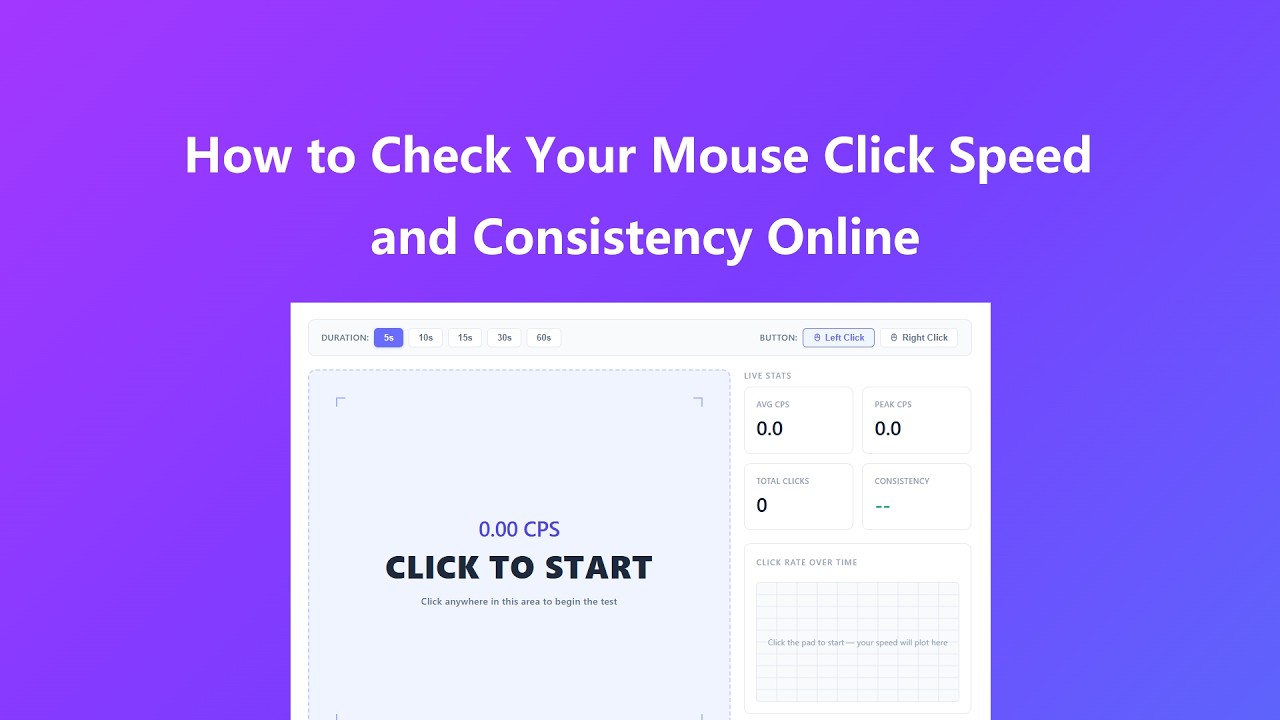
Running a test takes about ten seconds and requires no setup:
- Choose a test duration at the top — 5 seconds is great for a quick burst check, 30 or 60 seconds reveals your endurance and consistency over time.
- Select whether you want to test your left or right mouse button using the Button toggle.
- Click anywhere inside the blue dashed area to start the timer automatically. Click as fast as you can until time runs out.
- When the session ends, review your average CPS, peak CPS, total clicks, and consistency score. The graph shows how your speed changed throughout the test.
- Hit Reset to clear the board and run another session — try different durations or compare left vs. right button performance.
Key Features
- Five test durations (5, 10, 15, 30, 60 seconds) let you run everything from a quick burst check to a sustained endurance benchmark in one click.
- A live click-rate graph plots your CPS second by second so you can see your acceleration, plateau, and fatigue curve in real time.
- Independent left and right button modes let you isolate and compare each button's performance without mixing the data.
- Consistency score grades how steady your rhythm is — useful for spotting whether your speed drops off late in the session or stays even throughout.
- A progress bar counts down the test duration visually so you always know exactly how much time remains.
- Runs entirely in your browser with no login or installation required. Nothing is recorded or sent to a server.
Common Use Cases
People use this tool for a wide range of reasons:
- Gamers use it to measure clicking speed for titles where CPS directly affects performance, such as Minecraft PvP, Roblox, or auto-clicker configuration.
- Competitive players run repeated tests to track improvement over training sessions and optimize their grip style or clicking technique.
- Anyone suspecting their mouse is double-clicking or misfiring can use the click count vs. expected count to spot irregularities caused by switch wear.
- Productivity users test left vs. right button to confirm both switches feel and perform symmetrically before keeping or returning a new mouse.
- Developers and QA testers use click data to configure debounce thresholds in software that responds to rapid input events.
Frequently Asked Questions
What is a good CPS score?
Most people click between 6 and 9 times per second in a standard 10-second test. Trained gamers who use butterfly or jitter clicking techniques can reach 12–16 CPS or higher. For everyday computer use, anything above 5 CPS is perfectly normal and healthy. Focus on improving your own baseline rather than comparing to outlier scores.
Why does my click count seem higher than expected?
If your total clicks are significantly higher than your CPS times the test duration, your mouse switch may be registering double-clicks from a worn spring inside the microswitch. This is a hardware issue — the metal contact bounces briefly on each press, sending two signals instead of one. It typically worsens over time and is most common on mice with heavy use.
Does right-clicking work the same way as left-clicking?
Yes. Switch to Right Click mode in the toolbar and the pad will only register right mouse button presses. The context menu is suppressed inside the click area so it does not interfere with tracking. Right-click testing is useful if you use right-click-heavy workflows in games or software and want to check that button's responsiveness independently.
What does the Consistency score mean?
Consistency measures how evenly spaced your clicks are throughout the session, expressed as a percentage. A score near 100% means your click intervals were very uniform. A lower score means your speed varied significantly — you may have started fast and slowed down, or clicked in bursts. For gaming, a higher consistency score often matters more than a high peak CPS because it reflects reliable, repeatable input.
Can running other programs affect the results?
Heavy CPU load from other applications can delay browser event processing and introduce small timing errors. For the most accurate results, close resource-intensive programs before testing and use a modern browser with hardware acceleration enabled. Chrome and Edge generally produce the most consistent timing on Windows.
Is touch or trackpad clicking supported on mobile?
Yes. Touch taps are registered as clicks on mobile devices, so you can test your tapping speed on a phone or tablet. Only left-click mode is relevant on touch screens. Results will differ from a physical mouse since screen tapping engages different muscles and touch latency varies by device.
Tips to Improve Your Score
- Use the 5-second test first to find your natural peak CPS without fatigue, then move to 30 or 60 seconds to see how well you maintain that pace.
- Try different grip positions — a relaxed claw grip often produces a faster sustained rate than a full palm grip because your fingertips have more range of motion.
- Compare left vs. right button scores. A significant gap between the two may indicate switch wear on the lower-performing button rather than a technique difference.
- Track your score over multiple days. Natural improvement is real — regular practice builds muscle memory and finger speed the same way typing speed improves with repetition.
- If your Consistency score drops below 70%, try a slower, more deliberate rhythm before chasing maximum speed. A steady 7 CPS often beats an erratic 10 CPS in practice.