Dice Roller
Roll virtual dice online instantly. Supports D4, D6, D8, D10, D12, D20, and custom dice counts. Perfect for tabletop RPGs, board games, and random decisions. 100% free and fast.
What is This Tool
If you've ever been mid-session and realized someone forgot their dice bag - or you're playing online and need a roll everyone can trust - this is the tool you want open. It's a full-featured RPG dice roller built for D&D 5e, Pathfinder, and virtually any tabletop game that uses polyhedral dice.
The complete standard set is here: D4, D6, D8, D10, D12, D20, and D100 (percentile). Roll them one at a time, mix them together, or fire off a full set at once. For DMs and power players, the dice notation parser handles expressions like 4d6kh3 (classic attribute generation) or 8d6 (Fireball) the same way any VTT would - with a clear breakdown of every single die rolled, not just a final number.
The randomness comes from your browser's Web Crypto API, which means these rolls are cryptographically secure. No sketchy Math.random() shortcuts, no server calls, no ads, no tracking. Your rolls stay on your screen.
How to Use
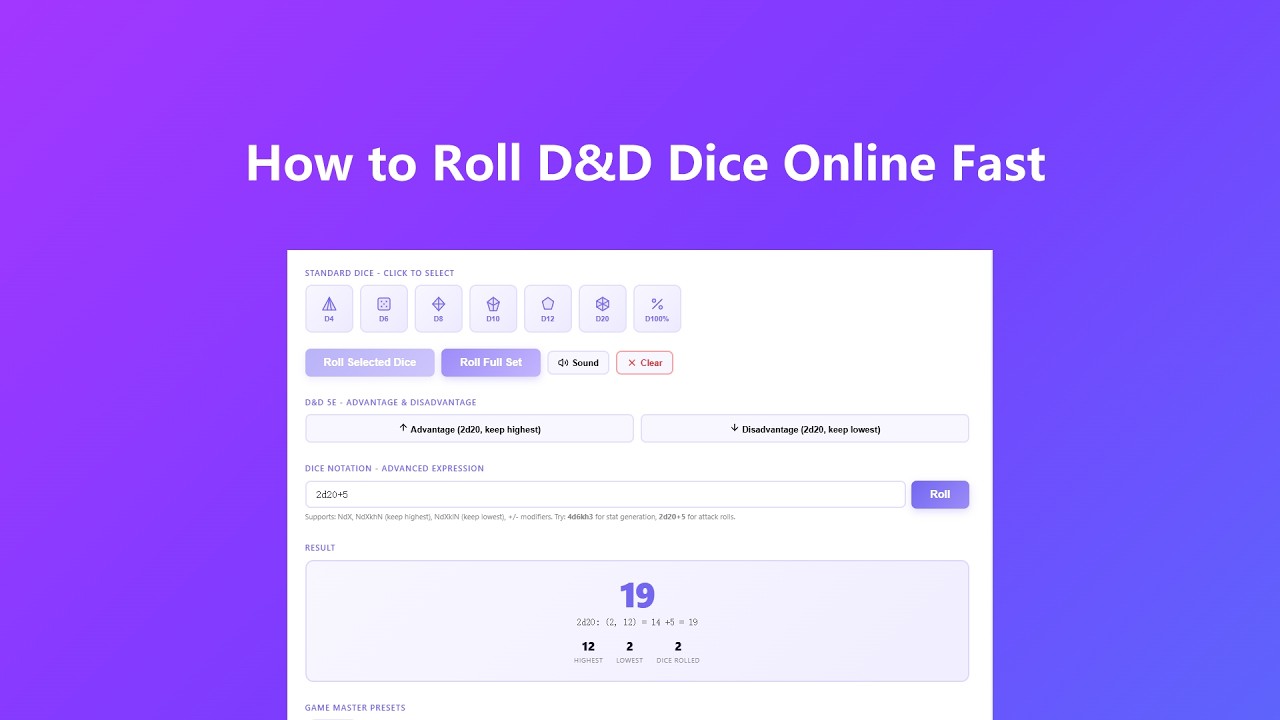
Getting your first roll takes about three seconds:
- Pick your dice by clicking any die button - D4 through D100. Each click adds one die to your roll queue, and a badge shows how many you've queued. Changed your mind? Click that same badge to remove one die at a time, no need to clear everything and start over. Mix and match freely, like two D6s and a D8, then hit "Roll Selected Dice." Want the full RPG set all at once? Hit "Roll Full Set" and every die fires together.
- Use the notation input if you already know the expression. Type something like 4d6kh3 for stat-block generation (four D6s, keep the three highest) or 2d20+5 for an attack roll. Press Enter or click Roll - the parser handles modifiers, keep-highest, and keep-lowest rules automatically.
- Check the result breakdown, not just the total. Every roll shows the individual die values, which ones were dropped (grayed out in kh/kl rolls), the sum, the highest, and the lowest - exactly what a DM or player needs to call the shot at the table.
- Save presets for your most common rolls. Name them whatever makes sense at your table - Fireball, Sneak Attack, Initiative - and they stay there for the session. One click re-fires any saved preset instantly.
Key Features
- Full polyhedral set with visual feedback covers all seven standard RPG dice - D4, D6, D8, D10, D12, D20, D100 - with click-to-queue selection, a tap-to-remove count badge for quick corrections, and a one-tap full-set roll for when things need to move fast at the table.
- Dice notation parser handles real DND expressions like 4d6kh3, 2d20+5, and 3d8-2, showing each individual die result alongside which dice were kept or dropped, so there's never any ambiguity about how a number landed.
- Advantage and Disadvantage shortcuts are built in specifically for D&D 5e - one button rolls two D20s and takes the higher, the other takes the lower, with the winning die clearly called out in the result.
- Cryptographically secure randomness uses the Web Crypto API's getRandomValues() instead of Math.random(), so the distribution holds up even if a stats-nerd at your table decides to run a chi-squared test on your rolls.
- GM Preset slots let the Dungeon Master or any player save named roll combinations for the session - great for recurring spells, weapon attacks, or any roll that comes up five times a night, without retyping the notation every time.
Common Use Cases
Here's where this tool actually gets used day-to-day:
- Online D&D and virtual tabletop sessions where a shared, verifiable roll is needed - paste the result in Discord or your VTT chat so the whole party sees the same breakdown, not just a number you typed in.
- Character creation stat rolling using 4d6kh3 for each ability score, with every die shown so the party knows the 18 Strength wasn't suspicious - the dice notation input handles the whole process in one line.
- Dungeon Masters running encounter damage, loot tables, wandering monster checks, and weather rolls during a live session - saved presets let you fire off Fireball or a random encounter roll without breaking narrative flow.
- Wargames and board games like Yahtzee variants, Risk, or Warhammer that use multiple D6s or mixed dice, where you need fast multi-die rolls and a clear breakdown of what each die landed on.
- Probability testing and game design - developers and designers building their own tabletop systems can check expected value distributions by running a notation expression repeatedly and watching the roll log fill in.
Frequently Asked Questions
Are these rolls actually random, or just Math.random() wrapped up nicely?
Genuinely different. This tool uses the Web Crypto API's getRandomValues() method, which is a cryptographically secure pseudorandom number generator - the same standard used in security-sensitive applications. Math.random() is explicitly not used. If you're curious about the implementation, it's all running client-side in your browser with no obfuscation.
What dice notation syntax does the parser support?
The parser handles standard NdX format (like 3d6 or 1d20), keep-highest with kh (like 4d6kh3), keep-lowest with kl (like 2d20kl1 for Disadvantage), and integer modifiers using + or - (like 2d8+4). Expressions can be typed directly or pasted - no spaces required around operators.
Do presets save between browser sessions?
Presets are saved in your browser's memory for the current session. Closing or refreshing the tab clears them. This is intentional - no data is written to localStorage or any server. If you need a preset permanently available, just keep the notation expression noted somewhere; it takes two seconds to re-enter.
How does the Advantage / Disadvantage button differ from typing 2d20kh1 myself?
They produce identical results mathematically. The dedicated buttons are just a one-tap shortcut that also labels the roll clearly in the history log as "Advantage" or "Disadvantage," which is easier to read aloud at the table compared to a raw notation string.
I clicked the wrong die - do I have to clear everything and start over?
No. Click the small count badge on the corner of any queued die to remove just one of that type, without touching the rest of your selection. The "Clear" button is still there for when you actually want to wipe the whole queue. Each die type also caps out at 99 per roll, which keeps the tool responsive and matches the notation input's own limit.
Can I use keyboard shortcuts to roll faster?
Yes. Press Space or Enter anywhere on the page (when the notation input isn't focused) to re-roll whatever you last rolled - same dice, same expression, fresh result. It's the fastest way to chain multiple rolls during combat without touching the mouse.
Advanced Tips
A few things that take this from useful to actually powerful at the table:
- Stack multiple die types before rolling - you can queue up a D6, a D8, and two D12s, then roll them all together and get the combined total with each die's value broken out separately. This covers mixed damage rolls like a Paladin's Divine Smite in one click.
- Use the notation input for advantage checks during high-speed combat: 2d20kh1 fires a full Advantage roll with the dropped die shown in the breakdown, which matters when a player disputes whether the DM took the right die. The log timestamps every roll so there's a record.
- Build a full GM preset library before the session starts - save presets for every recurring damage expression on your encounter sheet while you're doing prep, so during combat you're clicking names rather than typing notation under pressure.
- On mobile, the vibration feedback gives a tactile sense of rolling even without dice in hand - useful for accessibility or for players who find the physical dice hard to manage. Pair it with the sound on for the full ASMR effect, or mute both if you're playing somewhere quiet.