Word Counter
Free online word counter instantly counts words characters sentences paragraphs. No installation no login paste text get results in 1 second
What is This Tool
A Advanced Word Counter is an all-in-one professional text analysis utility designed for writers, editors, students, and digital marketers who require accurate, real-time metrics. Unlike basic character counters, this smart utility processes your content on the fly, offering rich insights such as total words, exact character distributions, paragraph metrics, and reading times to ensure compliance with strict publication standards.
In addition to standard statistical indicators, our tool features integrated keyword density tracking and deep linguistic pattern auditing (including upper/lowercase breakdowns and individual digit identification). Because it handles data locally within your native web browser, your essays, ad copies, or copy blocks remain confidential, fully safe, and secure from external server logs.
How to Use
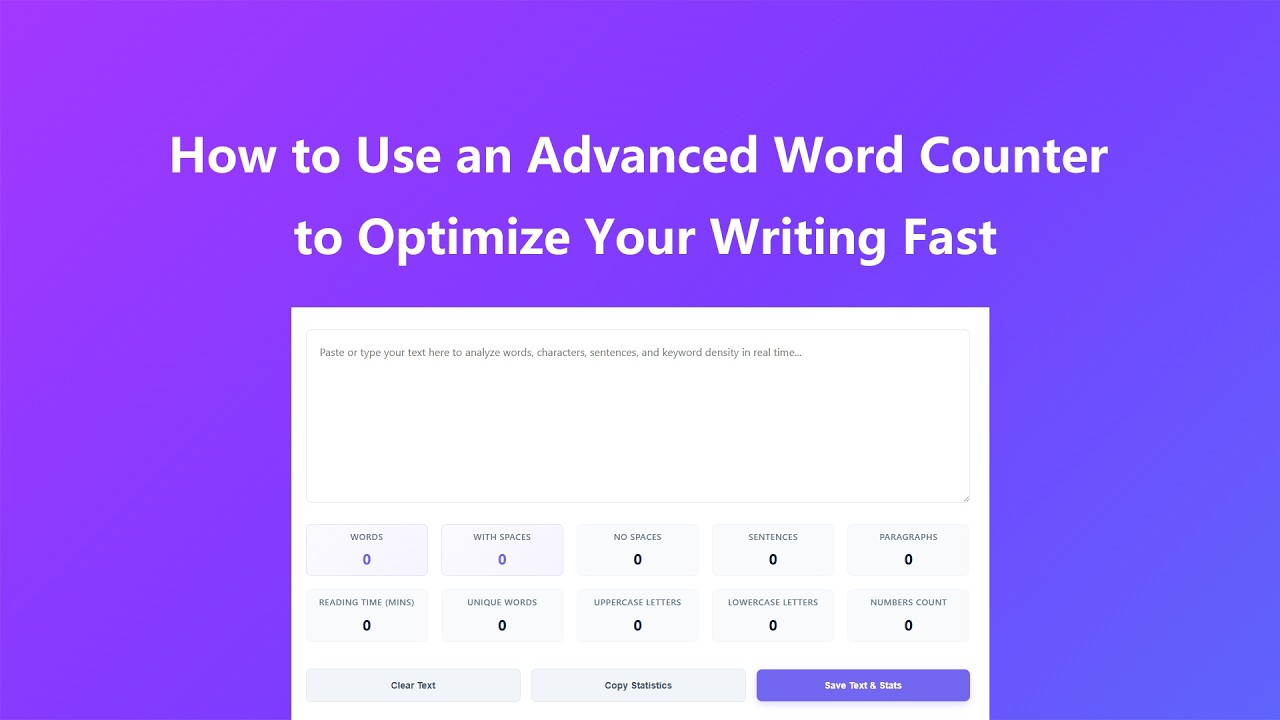
Using our Word Counter tool is intuitive and straightforward, requiring just a few simple steps to get comprehensive text statistics:
- Enter Your Text - Type directly into the text area or paste content from your document, email, essay, or any other source. The tool supports all common text formats and special characters.
- View Real-Time Statistics - Watch as the tool automatically updates word, character, sentence, and paragraph counts instantly as you type or edit your text.
- Check Character Counts - Review both character counts (with and without spaces) to meet specific platform or publication requirements (e.g., social media limits, essay guidelines).
- Monitor Keyword Density - Analyze the automatically generated list of top keywords to prevent over-optimization (keyword stuffing) and balance your content distribution.
- Use Action Productivity Tools - Instantly wipe your canvas using Clear Text, export data with Copy Statistics, or download your content backup along with metrics with Save Text & Stats.
Key Features
- Real-Time Counting - Instantly updates all statistics as you type or edit text, with no need to refresh the page or click a calculate button.
- Comprehensive Metrics - Counts words, characters (with/without spaces), sentences, and paragraphs for complete text analysis.
- Smart Keyword Density Analyzer - Automatically extracts and sorts high-frequency words, rendering visual tags paired with occurrence weights for immediate SEO tracking.
- Reading Time Estimation - Calculates accurate reading time based on average adult reading speed (200 words per minute) for content optimization.
- Local Processing - All text analysis happens in your browser with no data sent to servers, ensuring complete privacy and security.
- Text Management Tools - One-click clear function, statistics copying, and text saving features for enhanced productivity.
- Unlimited Text Length - Process long documents, essays, or manuscripts with no restrictions on text size or character limits.
- Mobile-Friendly Interface - Fully responsive design works seamlessly on smartphones, tablets, and desktop computers.
- Format Preservation - Maintains original line breaks and formatting for accurate paragraph and sentence counting.
- No Registration Required - Use the tool unlimited times without creating an account or providing personal information.
Common Use Cases
Our Word Counter tool is versatile and essential for numerous personal, academic, and professional scenarios:
- Academic Writing - Ensure essays, research papers, and dissertations meet specific word count requirements set by educational institutions.
- Content Creation - Optimize blog posts, articles, and website content for SEO and reader engagement with precise word counts.
- Social Media Management - Adhere to character limits on platforms like Twitter/X, Instagram, Facebook, and LinkedIn for maximum reach.
- Professional Documentation - Meet word count requirements for resumes, cover letters, reports, and business proposals.
- Creative Writing - Track progress on novels, short stories, and screenplays to meet publisher guidelines or personal writing goals.
- Editing & Proofreading - Analyze text structure with sentence and paragraph counts to improve readability and flow.
- Translation Projects - Verify word counts for accurate translation pricing and project timelines.
- Marketing Copy - Optimize ad copy, email campaigns, and marketing materials to fit platform requirements and improve conversion rates.
Frequently Asked Questions
Is the Word Counter tool free to use?
Yes! Our Word Counter is completely free to use with no limits on the amount of text you can analyze or the number of times you can use the tool. There are no premium features or hidden costs.
Does the tool store or share my text content?
No. All text analysis and counting happens locally in your web browser. None of your text data is transmitted to our servers, stored, or shared with any third parties. Your content remains completely private.
How accurate is the word count calculation?
Our Word Counter uses advanced text parsing algorithms to ensure 100% accuracy. It correctly counts words with hyphens, apostrophes, and special characters, and excludes empty spaces and line breaks from word counts while including them in character counts as needed.
Can I count words in non-English languages?
Yes! The tool works with most languages that use whitespace to separate words (English, Spanish, French, German, etc.). For languages without whitespace separation (e.g., Chinese, Japanese), the character count features will still provide accurate results.
How is reading time calculated?
Reading time is calculated based on the average adult reading speed of 200 words per minute, a standard used by publishers, educators, and content marketers. This provides a reliable estimate for general audience readability assessment.
Can I use this tool for very long documents?
Absolutely! The Word Counter can handle extremely long documents including novels, research papers, and full manuscripts with no performance issues. The tool processes text efficiently even with tens of thousands of words.
Advanced Tips
Maximize the utility of our Word Counter tool with these professional tips and best practices:
- Optimize for Character Limits - Use the "characters without spaces" metric to precisely meet social media character limits (e.g., Twitter's 280 characters) without manual counting.
- Improve Readability - Aim for 15-20 words per sentence (check sentence count vs word count) to enhance readability for online audiences.
- Track Writing Progress - Save your text and statistics at different stages to monitor writing progress and meet daily/weekly word count goals.
- Compare Draft Versions - Use the tool to compare word counts across different draft versions to identify expansion or reduction needs.
- Calculate Translation Costs - Use the precise word count to verify translation quotes, as most translators charge by the word.
- Optimize Email Marketing - Keep email subject lines under 50 characters (use character count) for optimal mobile display and open rates.
- Analyze Content Structure - Use paragraph count to ensure your content has short, scannable paragraphs (3-4 sentences each) for better online readability.
- Batch Process Multiple Texts - Clear and re-paste different text sections to quickly analyze multiple documents without reloading the page.