Case Converter
Free online text case converter for uppercase, lowercase, title case, sentence case and more. Fast simple private and 100% browser based free tool
What is This Tool
Our Online Text Case Converter is a fast, accurate, and fully browser-based utility built to transform blocks of text into 17 distinct casing and formatting styles across three categories: Standard Case Styles, Developer Naming Cases, and Text Formatting Utilities. Whether you need to fix a document written accidentally in ALL CAPS, format variables for programming, or align headlines with editorial style guides, this converter standardizes formatting instantly. Designed with developers, content creators, and editors in mind, it provides robust case operations without altering your punctuation, numbers, or other necessary symbols.
Unlike the default case tools packed inside rigid word processors, this converter runs entirely on the client side, right inside your browser. Your inputs are never transmitted, processed, or saved on external servers, providing full data confidentiality for sensitive drafts, code, or business content. Simply enter your copy, pick a style, and copy or download the flawless output in seconds.
How to Use
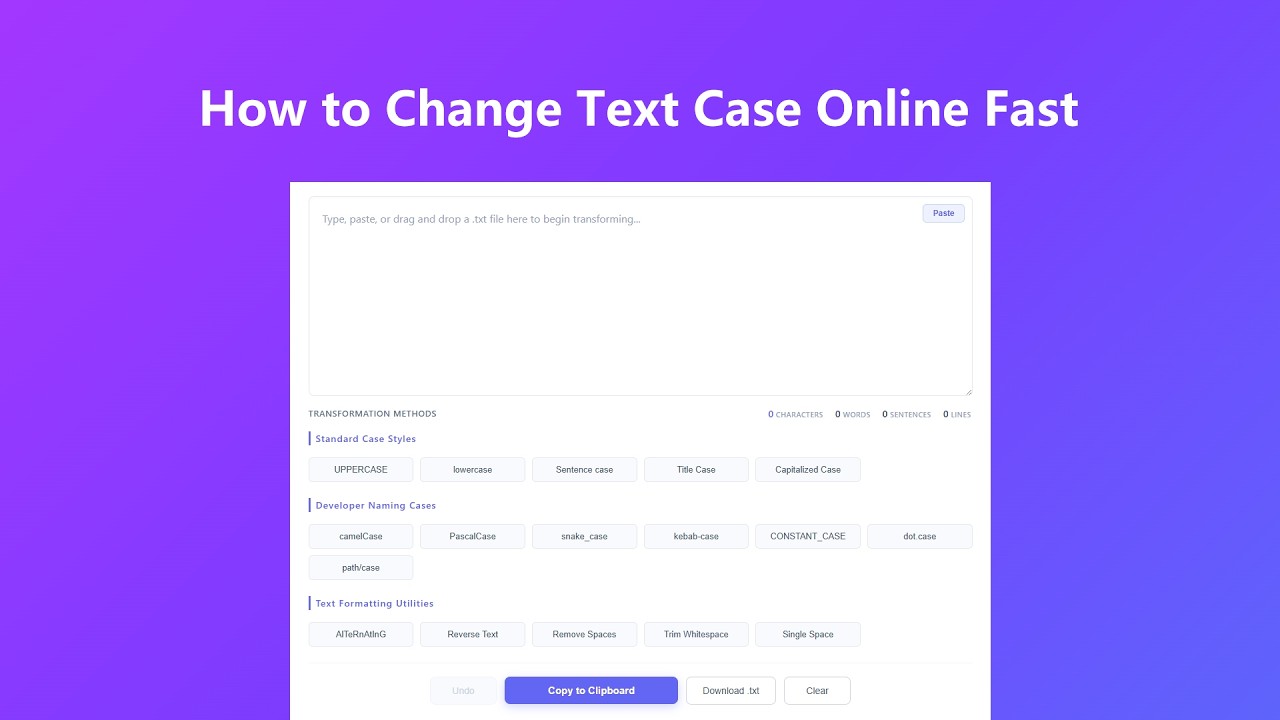
Get perfectly formatted text in just a few quick steps:
- Add Your Text: Type directly into the workspace, paste with Ctrl+V (or Cmd+V on Mac), tap the Paste button for one-tap clipboard access on mobile, or drag and drop a .txt file straight onto the box.
- Pick a Formatting Method: Click any control across Standard Case Styles, Developer Naming Cases, or Text Formatting Utilities to apply that transformation instantly.
- Review Your Stats: Character, word, sentence, and line counts update automatically so you always know the size and shape of your text.
- Revert or Modify: Made an extra click? Hit Undo to step backward through your conversion history.
- Copy or Download: Click "Copy to Clipboard" for a quick paste elsewhere, or "Download .txt" to save the result as a text file on your device.
- Reset the Board: Select Clear to wipe the current text and stats before starting your next batch.
Key Features
- 17 Case & Formatting Styles: Switch instantly between Sentence case, Title Case, Capitalized Case, UPPERCASE, lowercase, camelCase, PascalCase, snake_case, kebab-case, CONSTANT_CASE, dot.case, path/case, alternating case, reversed text, and quick whitespace cleanup tools.
- Grammar-Aware Title Case: Title Case follows standard English capitalization rules, keeping short articles, conjunctions, and prepositions lowercase unless they open or close the line, just like a properly styled headline.
- Real-Time Text Analytics: Character, word, sentence, and line counts update live as you type or apply a transformation, so you always know exactly what you're working with.
- Unlimited Text Length: Process short labels, full articles, or entire scripts with no character limit imposed by the tool.
- One-Tap Paste & Drag-and-Drop: Tap the Paste button to pull text straight from your clipboard on mobile, or drag a .txt file onto the workspace to load it instantly.
- Copy or Download Your Result: Send the finished text straight to your clipboard, or save it as a standalone .txt file with the Download button.
- Private, Client-Side Processing: Every transformation runs locally in your browser. No text is ever uploaded, logged, or stored on our servers.
- Multi-Step Undo History: A local history buffer tracks every change, so you can step backward through your edits whenever you need to.
- Fully Responsive Layout: The workspace, buttons, and stats bar resize and reflow cleanly across phones, tablets, and desktop screens.
Common Use Cases
This text converter is ideal for streamlining workflows across multiple professional fields:
- Software Engineering & Development: Standardize variable names, database fields, or file paths into proper camelCase, PascalCase, snake_case, kebab-case, dot.case, path/case, or CONSTANT_CASE to keep your codebase consistent.
- SEO & Editorial Management: Format page titles and headings into clean, grammar-aware Title Case, Sentence case, or Capitalized Case for polished search result listings and article headers.
- Copywriting & Social Media: Fix headlines accidentally typed in ALL CAPS, build eye-catching aLtErNaTiNg text for captions, or clean up copy before scheduling a post.
- Data Cleanup & Spreadsheet Prep: Paste messy datasets or customer lists to strip extra spaces and stray whitespace, then copy the cleaned rows straight back into your spreadsheet or database import.
- Academic & Legal Formatting: Bring citations, reference lists, or document headers in line with APA, MLA, or Chicago style guidelines, then download the finished text for your files.
Frequently Asked Questions
Is this online case converter free to use?
Yes, this converter is completely free. There are no character caps, subscription fees, or features locked behind paywalls. Use it as frequently as your workflows require.
Does your system record or save my text inputs?
No. All scripts run entirely within your local browser sandbox. No input text, draft strings, or custom scripts are uploaded to servers, ensuring total privacy for sensitive enterprise data.
Does the converter preserve special punctuation and accents?
Yes. The transformation layer strictly targets standard alphanumeric character cases, ensuring your custom punctuation marks, brackets, numerals, and international Unicode accents stay preserved.
What is the functional difference between Title Case and Capitalized Case?
Title Case applies smart capitalization based on English grammar rules, ignoring short prepositions and articles (e.g., "The Lord of the Rings"). Capitalized Case forces every single word to start with an uppercase letter regardless of its grammar role.
Can I paste text directly from my clipboard?
Yes. Tap the Paste button above the text box to insert your clipboard content in a single tap, which is especially handy on mobile. You can also use the standard Ctrl+V (or Cmd+V on Mac) shortcut, or drag and drop a .txt file straight onto the workspace.
Can I download my converted text instead of copying it?
Yes. Click "Download .txt" to save your converted text as a plain text file to your device, which is useful for archiving longer documents or moving text between apps that don't support clipboard pasting.
How many modifications can I undo?
The tool keeps a running history of your changes for the current session. Click Undo repeatedly to step backward through your transformation timeline until the button becomes inactive, meaning you're back at your original input.
Advanced Tips
Boost your productivity with these workflow optimization strategies:
- Sequential Multi-Staging: Combine utilities to handle cluttered data. Run "Trim Whitespace" or "Single Space" first to clean up formatting flaws before converting to camelCase or Title Case.
- Spreadsheet Batch Formatting: Clean entire rows or columns by pasting data directly into the tool, applying a casing conversion, and moving the sanitized block right back into your sheets.
- Quick Mobile Workflow: On a phone, use the Paste button instead of the standard long-press menu to load clipboard text in one tap, then use Download .txt to save the result without fighting with mobile copy-paste.
- Bulk File Conversion: Drag a .txt file directly onto the workspace to load it instantly, apply your transformation, then use Download .txt to export the finished version without retyping anything.
- Code Variable Conversions: Safely convert raw text structures into dot paths or file directories by applying dot.case or path/case instantly.