Line Break Remover
Easily remove line breaks, clean up extra spaces, and consolidate text online for free. Ideal for coders, writers, and marketers needing instant text formatting.
What is This Tool
When copying text from PDFs or old Word documents and pasting it elsewhere, forced line breaks often occur at the end of lines, splitting the text like poetry. This line break cleanup tool can repair such broken and messy text, organize it into smooth and readable standard paragraphs, and adapt to the formatting requirements of various work scenarios.
It's not just about deleting line breaks in bulk. You can freely set the replacement rules for line breaks: choose to seamlessly merge text, replace with regular spaces, separate entries with commas, or fill in any custom separator symbol. It also supports retaining the original paragraph spacing, avoiding the entire text being merged into a dense block of text, and ensuring a good reading experience for long texts.
How to Use
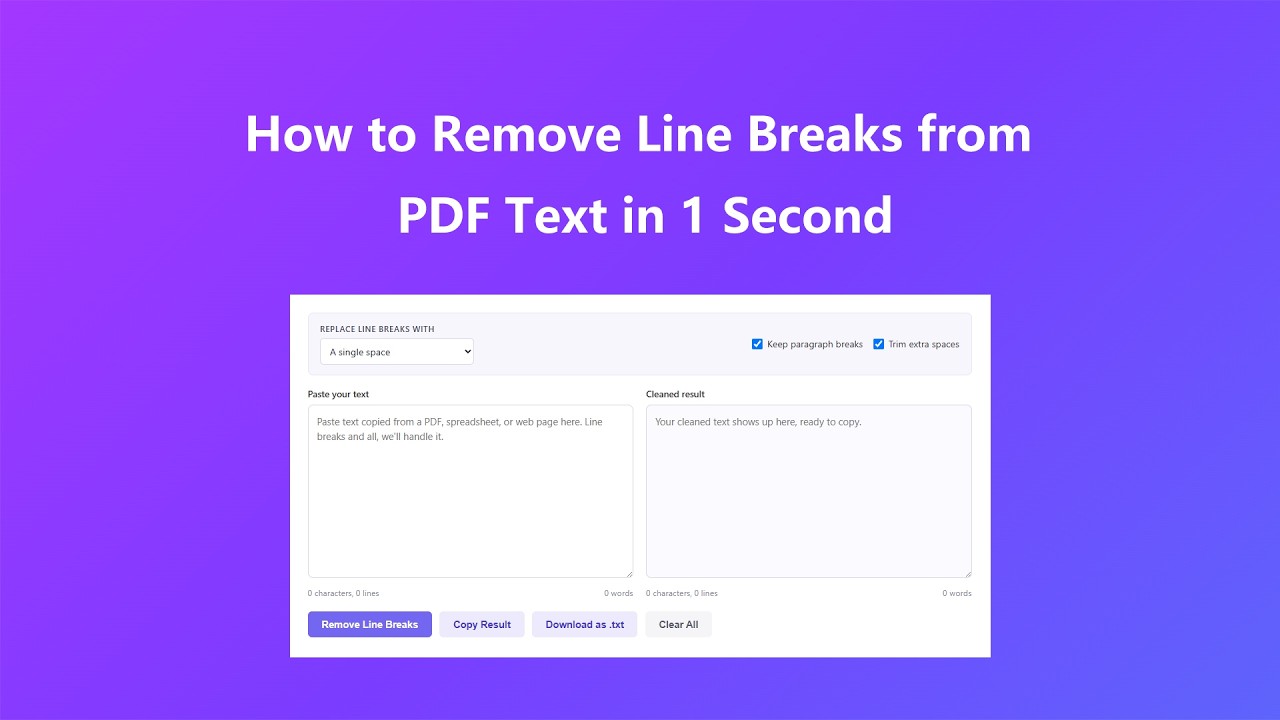
- Place the text to be processed into the input box on the left. It supports direct dragging and dropping of text, copying and pasting, or manual entry. It can recognize and process various hidden line breaks in the text.
- Select a line break handling scheme through the dropdown menu: completely remove line breaks, replace with spaces, replace with commas, or customize the delimiter (vertical bars, semicolons, etc. are all acceptable).
- If you are organizing long texts such as articles and papers and need to retain the original paragraph spacing, you can enable "Retain Paragraph Breaks"; if you are pursuing a concise layout, you can enable "Trim Excessive Spaces".
- After the settings are complete, click "Remove Line Breaks". The processing results will be displayed in the output box on the right. The content supports one-click copying to the clipboard, and can also be exported as a text file for saving and future use.
Key Features
- The tool provides three modes for handling line breaks: completely removing line breaks, replacing line breaks with spaces, or replacing them with commas. The processed text can be directly imported into a spreadsheet.
- Custom delimiters allow for the use of any character or text to concatenate rows, unrestricted by default options.
- Turn on the "Preserve paragraph separators" switch to retain the original paragraph spacing, preventing long documents from being merged into one unreadable paragraph.
- When entering or pasting text, the character count, line count, and word count are updated in real-time, allowing you to keep track of the text volume at any time.
- Support one-click copying of cleaned text, and the ability to directly export it as a TXT file, adapting to various workflows and eliminating extra operational steps.
Common Use Cases
Users utilize line break removal tools in numerous daily scenarios, with the following being the most common ones:
- Clean up paragraph content copied from PDFs. Such text comes with hidden hard line breaks, which can cause the text layout to become fragmented and difficult to read when pasted onto other platforms.
- Organize a list of names, emails, product codes, etc., standardize each row to ensure consistency, and facilitate importing into a spreadsheet to avoid content being disorganized and scattered.
- Organize text extracted from old Word documents and email conversations. This type of content, having been forwarded and edited multiple times, is filled with a large number of messy line breaks.
- Clean the data extracted from web pages and then import it into the content management system (CMS) to avoid issues of messy formatting in titles and body text.
- Combine multiple lines of address, signature, and note information into a single line of text to accommodate form, CSV file, or database field entry requirements.
Frequently Asked Questions
Will this tool also clean up tab characters and double spaces?
Yes. After enabling the "Remove Excessive Spaces" function, it will simultaneously merge tags and duplicate spaces, reducing them to a single space, and also remove your line breaks. As a result, the output will not only be closely connected but also appear very tidy indeed.
What is the difference between different removal modes?
"No delimiter" will directly connect words without any gap, which is suitable for code or IDs. "Space" and "Comma" are more suitable for ordinary sentences and list data. "Custom" allows you to enter your own delimiter, such as a vertical bar or semicolon, to meet more specific separation needs.
Will this change or upload my original file to any other place?
No, all operations are directly performed within the browser tab. The text you paste in the text box on the left will remain unchanged, and any content you enter will not be sent to or saved on our server.
Is there a limit to the length of text that can be pasted at one time?
You can paste in very large blocks of text, including entire articles or reports, and the tool will still process them immediately because the entire process takes place locally, without any server round-trips. No, all operations are directly performed within the browser tab.
Why did the paragraph spacing disappear after I cleaned up the text?
Before clicking "Remove Line Breaks", please ensure that "Retain Paragraph Breaks" is checked. When this option is enabled, double line breaks between paragraphs will be retained, and only the single hard return character within each paragraph will be cleared.
Advanced Tips
After mastering the basic operations, the following methods can help you make better use of this tool:
- When converting a stacked list of items into a row for CSV, use a comma separator to avoid having to manually re-enter the entire list.
- Pair the custom delimiter "|" with data that needs to maintain visual separation even after the line breaks disappear. This is particularly useful for logs or exported files.
- For articles, blog drafts, or reports, please keep "Retain paragraph separators" turned on; then for short lists or single-line fields such as addresses, please individually turn it off.
- When preparing text in spreadsheet cells, be sure to use the "Remove Excessive Spaces" function to process the results, as excessive spaces often lead to column mismatches in the future.