Date Calculator
Free online date calculator to find days between two dates, add or subtract days, and calculate date difference instantly.
What is This Tool
This Date Calculator is a free online utility built to compute the precise difference between two dates, giving you accurate counts of total days, weeks, months, years, and even hours between any start and end date you choose. In addition to counting durations, this dual-purpose tool also works as a date arithmetic calculator, letting you add or subtract a specific number of years, months, weeks, or days from any starting date to instantly find a future or past calendar target.
Unlike manual calendar counting, this calculator automatically adjusts for leap years and varying month lengths, so you never have to worry about miscounting February or a 30 vs. 31-day month. All calculations use the dates exactly as you enter them in your browser's local time, with no server round-trip required. The tool supports a full date range from 1900 to 2100, making it equally useful for historical research, genealogy, and long-term future planning in both personal and professional contexts.
How to Use
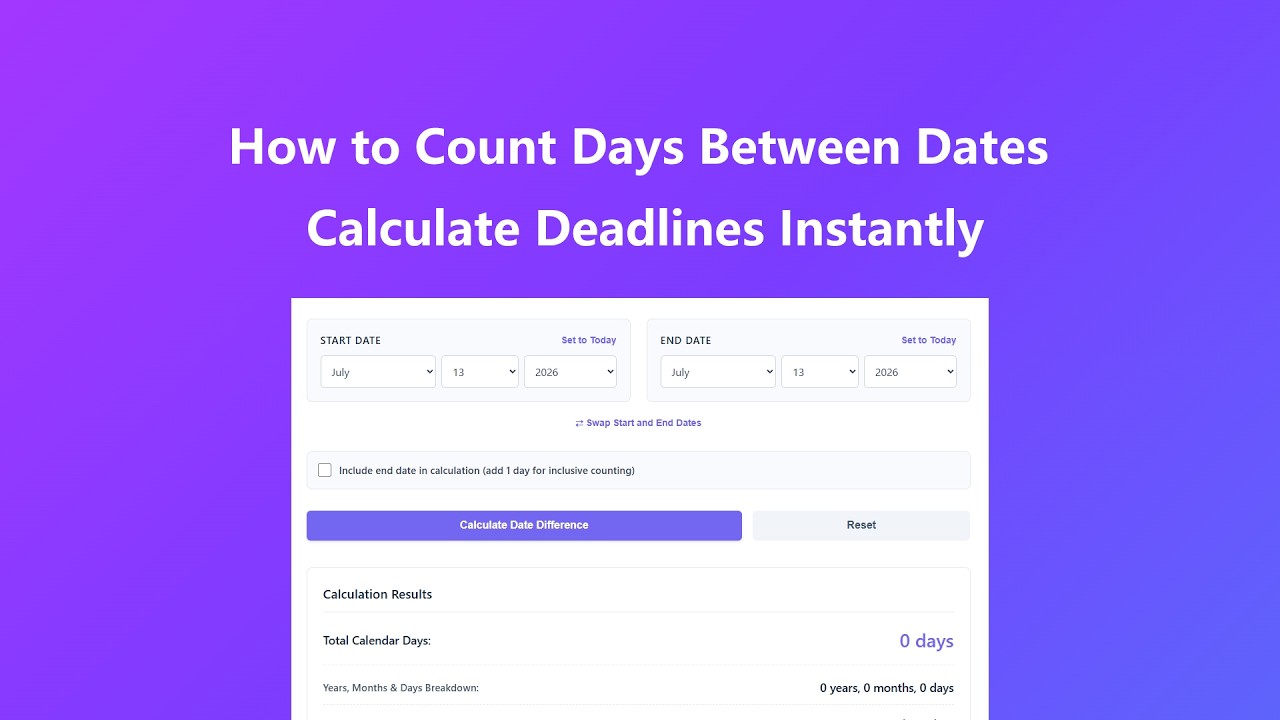
- Choose Your Mode - Switch between the "Count Days Between Dates" tab to measure date intervals, or the "Add / Subtract Days" tab to compute a target date based on an exact duration offset.
- Select Your Start Date - Choose the month, day, and year using the dropdown menus arranged in the standard U.S. date format (Month/Day/Year), or click "Set to Today" to instantly fill in the current local date.
- Set Your End Date or Time Adjustments - For date intervals, pick an end date, then use the "Swap Start and End Dates" link if you entered them in the wrong order. You can also toggle "Include end date in calculation" to add an extra day for inclusive counting. For date math, choose Add or Subtract and enter your desired years, months, weeks, and days.
- Run the Calculation - Click the main calculation button to get an instant result. Everything runs in your browser, so there's no page reload or waiting on a server.
- Review the Results - Check the detailed breakdown, which includes total calendar days, a year/month/day summary, an alternate weeks-and-days view, and total elapsed hours.
- Reset for New Calculations - Use the "Reset" button to restore today's date and default values so you can run another calculation right away.
Key Features
- Two-In-One Calculation Modes - Supports both date difference calculations (counting intervals) and date arithmetic (adding or subtracting years, months, weeks, or days) in one tool.
- One-Click Date Swap - Entered your start and end dates in the wrong order? The "Swap Start and End Dates" button instantly reverses them instead of forcing you to re-enter everything.
- Inclusive Date Toggling - A dedicated checkbox lets you include or exclude the final calendar day, which matters for legal, rental, and billing timeframes.
- Precision Calculation - Computes exact date differences down to the hour, correctly accounting for leap years and every month's actual length (28, 29, 30, or 31 days).
- Extended Date Range - Supports date calculations from 1900 to 2100, useful for historical research, legacy planning, and long-term future projections alike.
- Multiple Result Formats - Displays results as total days, a years/months/days breakdown, a weeks-and-days alternative, and total elapsed hours.
- Intuitive, Accessible Interface - Clean dropdown menus with keyboard focus support and screen-reader labels make date selection simple across devices and input methods.
- Instant Results - Generates complete date calculations in milliseconds, with no loading spinners or page reloads.
- Local Processing - All calculations run entirely inside your browser; no dates you enter are ever transmitted to or stored on a server.
Common Use Cases
- Project Deadline Tracking - Add or subtract a fixed business period (e.g., 6 weeks or 90 days) to a baseline date to map out project milestones and delivery schedules.
- Lease & Contract Terms - Measure exact rental, lease, or service agreement periods by adding or subtracting years or days, using the "Include end date" option for legally precise, inclusive terms.
- Subscription & Free Trial Tracking - Add a trial or billing period (e.g., 14 or 30 days) to a sign-up date to know exactly when a free trial ends or the next charge is due.
- Event & Travel Planning - Calculate the exact number of days until a wedding, vacation, flight, or business trip to build a detailed countdown and packing timeline.
- Financial & Tax Deadlines - Determine the duration of loans, investment terms, or billing cycles, or count days to key deadlines like April 15th tax filing.
- Historical & Genealogical Research - Measure the exact time between historical events, birth and death dates, or family milestones for academic or genealogy projects.
- Employment & HR - Verify work anniversaries, probation periods, contract durations, or notice periods with precise, audit-ready date calculations.
- Personal Milestones - Track the time since a birthday, anniversary, or move, or count down to an upcoming personal goal with an exact day count.
Frequently Asked Questions
Does the tool account for leap years in its calculations?
Yes, the date calculator automatically adjusts for leap years, including February 29th, to ensure all date difference calculations are 100% accurate regardless of the year range selected.
What does the "Include end date" option do?
By default, standard calendar formulas subtract the start from the end date, which excludes the final day itself (counting nights or full 24-hour periods). Checking "Include end date" appends 1 full day, which is useful for calculating total employment span, active insurance policies, or travel durations where the final day is fully utilized.
Can I add or subtract fractional values like half a month or 1.5 weeks?
The "Add / Subtract Days" panel accepts absolute integers for years, months, weeks, and days to safeguard structural calendar precision. For fractions, simply convert them into an equivalent number of base days (e.g., use 14 days for 2 weeks) to execute your computation accurately.
Can I calculate dates beyond the 1900-2100 range?
No. The year dropdown menus only list years from 1900 through 2100, so this is the selectable range in the interface. We chose this window because it covers the vast majority of personal, business, and historical use cases while keeping the calculator fast and accurate.
Are calculations performed on the server or locally in my browser?
All date calculations are processed locally within your web browser. No personal data or date selections are transmitted to our servers, ensuring complete privacy and data security.
Can I calculate the difference between a past date and today's date?
Absolutely. You can set today's date as either the start or end date to measure time elapsed since a past event or time remaining until a future date, with real-time accuracy.
Why do my manual calculations differ from the tool's results?
Manual date counting often fails to account for leap years, varying month lengths, or the exact time of day. Our tool uses advanced algorithms to factor in these variables, resulting in more accurate results than manual methods.
Is the tool compatible with mobile devices?
Yes, the date calculator features a fully responsive design that works seamlessly on smartphones, tablets, and desktop computers, with touch-friendly dropdown menus that reflow into a single column on smaller screens.
What happens if I accidentally enter my start and end dates backwards?
Click the "Swap Start and End Dates" link located between the two date fields on the "Count Days Between Dates" tab. It instantly reverses your selections so you don't have to re-pick both dates from scratch.
Advanced Tips
- Fixing Reversed Dates Quickly - If you get an error saying the start date is later than the end date, use the "Swap Start and End Dates" button instead of manually re-selecting both dropdowns.
- Leap Year Planning - When a calculation spans February 29, try the same date range in a nearby non-leap year to see how the day count shifts before finalizing plans.
- Batch Calculations - For multiple date comparisons, reset the tool after each run and record the results in a spreadsheet to keep a clear log for tracking or reporting.
- Selectable Date Range - The year dropdowns cover 1900-2100; for dates outside that window, you'll need historical calendar references or a specialized tool.
- Deadline Buffer Planning - Add a small buffer (e.g., 2-3 days) on top of a calculated target date for project or shipping deadlines to account for unforeseen delays.
- Hourly Precision - For time-sensitive work such as legal notice periods or billing cycles, use the "Total Elapsed Hours" result alongside the day count for extra precision.